
flutter_native_splash
v2.4.6Customize Flutter's default white native splash screen with background color and splash image. Supports dark mode, full screen, and more.
Package archive: https://pubdev.letsnova.ru/api/archives/flutter_native_splash/2.4.6.tar.gz
dart pub add flutter_native_splashReadme
When your app is opened, there is a brief time while the native app loads Flutter. By default, during this time, the native app displays a white splash screen. This package automatically generates iOS, Android, and Web-native code for customizing this native splash screen background color and splash image. Supports dark mode, full screen, and platform-specific options.
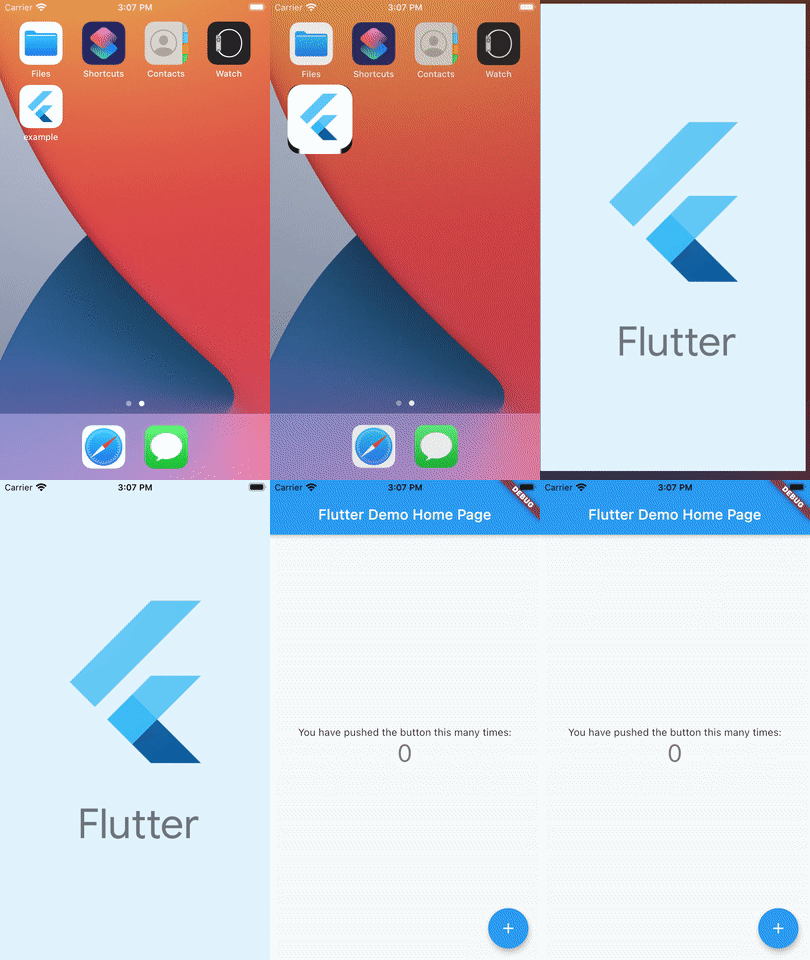
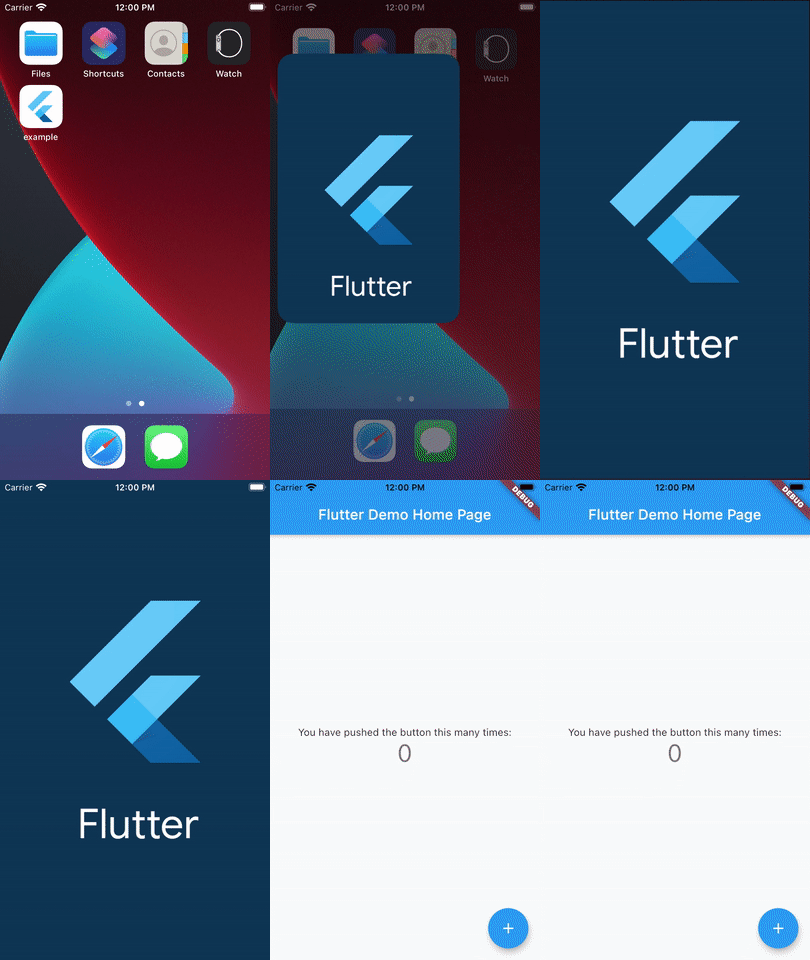
What's New
Support for GIF images in web.
You can now keep the splash screen up while your app initializes! No need for a secondary splash screen anymore. Just use the preserve and remove methods together to remove the splash screen after your initialization is complete. See details below.
Usage
Would you prefer a video tutorial instead? Check out Johannes Milke's tutorial.
First, add flutter_native_splash as a dependency in your pubspec.yaml file.
dependencies:
                  flutter_native_splash: ^2.4.6
Don't forget to flutter pub get.
1. Setting the splash screen
Customize the following settings and add to your project's pubspec.yaml file or place in a new file in your root project folder named flutter_native_splash.yaml.
flutter_native_splash:
                  # This package generates native code to customize Flutter's default white native splash screen
                  # with background color and splash image.
                  # Customize the parameters below, and run the following command in the terminal:
                  # dart run flutter_native_splash:create
                  # To restore Flutter's default white splash screen, run the following command in the terminal:
                  # dart run flutter_native_splash:remove

                  # IMPORTANT NOTE: These parameter do not affect the configuration of Android 12 and later, which
                  # handle splash screens differently that prior versions of Android.  Android 12 and later must be
                  # configured specifically in the android_12 section below.

                  # color or background_image is the only required parameter.  Use color to set the background
                  # of your splash screen to a solid color.  Use background_image to set the background of your
                  # splash screen to a png image.  This is useful for gradients. The image will be stretch to the
                  # size of the app. Only one parameter can be used, color and background_image cannot both be set.
                  color: "#42a5f5"
                  #background_image: "assets/background.png"

                  # Optional parameters are listed below.  To enable a parameter, uncomment the line by removing
                  # the leading # character.

                  # The image parameter allows you to specify an image used in the splash screen.  It must be a
                  # png file and should be sized for 4x pixel density.
                  #image: assets/splash.png

                  # The branding property allows you to specify an image used as branding in the splash screen.
                  # It must be a png file. It is supported for Android, iOS and the Web.  For Android 12,
                  # see the Android 12 section below.
                  #branding: assets/dart.png

                  # To position the branding image at the bottom of the screen you can use bottom, bottomRight,
                  # and bottomLeft. The default values is bottom if not specified or specified something else.
                  #branding_mode: bottom

                  # Set the branding padding from the bottom of the screen.  The default value is 0
                  # (Not supported on web yet)
                  # branding_bottom_padding: 24

                  # The color_dark, background_image_dark, image_dark, branding_dark are parameters that set the background
                  # and image when the device is in dark mode. If they are not specified, the app will use the
                  # parameters from above.  If there is no parameter above, the app will use the light mode values.
                  # If the image_dark parameter is specified, color_dark or background_image_dark must be specified.
                  # color_dark and background_image_dark cannot both be set.
                  #color_dark: "#042a49"
                  #background_image_dark: "assets/dark-background.png"
                  #image_dark: assets/splash-invert.png
                  #branding_dark: assets/dart_dark.png

                  # From Android 12 onwards, the splash screen is handled differently than in previous versions.
                  # Please visit https://developer.android.com/guide/topics/ui/splash-screen
                  # Following are specific parameters for Android 12+.
                  android_12:
                    # The image parameter sets the splash screen icon image.  If this parameter is not specified,
                    # the app's launcher icon will be used instead.
                    # Please note that the splash screen will be clipped to a circle on the center of the screen.
                    # App icon with an icon background: This should be 960×960 pixels, and fit within a circle
                    # 640 pixels in diameter.
                    # App icon without an icon background: This should be 1152×1152 pixels, and fit within a circle
                    # 768 pixels in diameter.  To fit a 1152x1152 image within a circle with a 768 diameter, simply
                    # ensure that the most important design elements of your image are placed within a circular area
                    # with a 768 diameter at the center of the 1152x1152 canvas.
                    #image: assets/android12splash.png

                    # Splash screen background color.
                    #color: "#42a5f5"

                    # App icon background color.
                    #icon_background_color: "#111111"

                    # The branding property allows you to specify an image used as branding in the splash screen.
                    #branding: assets/dart.png

                    # The image_dark, color_dark, icon_background_color_dark, and branding_dark set values that
                    # apply when the device is in dark mode. If they are not specified, the app will use the
                    # parameters from above.  If there is no parameter above, the app will use the light mode values.
                    #image_dark: assets/android12splash-invert.png
                    #color_dark: "#042a49"
                    #icon_background_color_dark: "#eeeeee"

                  # The android, ios and web parameters can be used to disable generating a splash screen on a given
                  # platform.
                  #android: false
                  #ios: false
                  #web: false

                  # Platform specific images can be specified with the following parameters, which will override
                  # the respective parameter.  You may specify all, selected, or none of these parameters:
                  #color_android: "#42a5f5"
                  #color_dark_android: "#042a49"
                  #color_ios: "#42a5f5"
                  #color_dark_ios: "#042a49"
                  #color_web: "#42a5f5"
                  #color_dark_web: "#042a49"
                  #image_android: assets/splash-android.png
                  #image_dark_android: assets/splash-invert-android.png
                  #image_ios: assets/splash-ios.png
                  #image_dark_ios: assets/splash-invert-ios.png
                  #image_web: assets/splash-web.gif
                  #image_dark_web: assets/splash-invert-web.gif
                  #background_image_android: "assets/background-android.png"
                  #background_image_dark_android: "assets/dark-background-android.png"
                  #background_image_ios: "assets/background-ios.png"
                  #background_image_dark_ios: "assets/dark-background-ios.png"
                  #background_image_web: "assets/background-web.png"
                  #background_image_dark_web: "assets/dark-background-web.png"
                  #branding_android: assets/brand-android.png
                  #branding_bottom_padding_android: 24
                  #branding_dark_android: assets/dart_dark-android.png
                  #branding_ios: assets/brand-ios.png
                  #branding_bottom_padding_ios: 24
                  #branding_dark_ios: assets/dart_dark-ios.png
                  #branding_web: assets/brand-web.gif
                  #branding_dark_web: assets/dart_dark-web.gif

                  # The position of the splash image can be set with android_gravity, ios_content_mode, and
                  # web_image_mode parameters.  All default to center.
                  #
                  # android_gravity can be one of the following Android Gravity (see
                  # https://developer.android.com/reference/android/view/Gravity): bottom, center,
                  # center_horizontal, center_vertical, clip_horizontal, clip_vertical, end, fill, fill_horizontal,
                  # fill_vertical, left, right, start, or top. android_gravity can be combined using the | operator to achieve multiple effects.
                  # For example:
                  # `android_gravity: fill|clip_vertical` - This will fill the width while maintaining the image's vertical aspect ratio
                  #android_gravity: center
                  #
                  # ios_content_mode can be one of the following iOS UIView.ContentMode (see
                  # https://developer.apple.com/documentation/uikit/uiview/contentmode): scaleToFill,
                  # scaleAspectFit, scaleAspectFill, center, top, bottom, left, right, topLeft, topRight,
                  # bottomLeft, or bottomRight.
                  #ios_content_mode: center
                  #
                  # web_image_mode can be one of the following modes: center, contain, stretch, and cover.
                  #web_image_mode: center

                  # The screen orientation can be set in Android with the android_screen_orientation parameter.
                  # Valid parameters can be found here:
                  # https://developer.android.com/guide/topics/manifest/activity-element#screen
                  #android_screen_orientation: sensorLandscape

                  # To hide the notification bar, use the fullscreen parameter.  Has no effect in web since web
                  # has no notification bar.  Defaults to false.
                  # NOTE: Unlike Android, iOS will not automatically show the notification bar when the app loads.
                  #       To show the notification bar, add the following code to your Flutter app:
                  #       WidgetsFlutterBinding.ensureInitialized();
                  #       SystemChrome.setEnabledSystemUIMode(SystemUiMode.manual, overlays: [SystemUiOverlay.bottom, SystemUiOverlay.top], );
                  #fullscreen: true

                  # If you have changed the name(s) of your info.plist file(s), you can specify the filename(s)
                  # with the info_plist_files parameter.  Remove only the # characters in the three lines below,
                  # do not remove any spaces:
                  #info_plist_files:
                  #  - 'ios/Runner/Info-Debug.plist'
                  #  - 'ios/Runner/Info-Release.plist'
2. Run the package
After adding your settings to pubspec.yaml, run the following command in the terminal:
dart run flutter_native_splash:create
When the package finishes running, your splash screen is ready.
(Optionally), If you added your config to a separate YAML file instead of pubspec.yaml, just add --path with the command in the terminal:
dart run flutter_native_splash:create --path=path/to/my/file.yaml
| Command | Description |
|---|---|
| -h, --[no-]help | Show help |
| -p, --path | Path to the flutter project, if the project is not in it's default location. |
| -f, --flavor | Flavor to create the splash for. The flavor must match the pattern flutter_native_splash-*.yaml (where * is the flavor name). |
| -F, --flavors | Comma separated list of flavors to create the splash screens for. Match the pattern flutter_native_splash-*.yaml (where * is the flavor name). |
| -A, --[no-]all-flavors | Create the splash screens for all flavors that match the pattern flutter_native_splash-*.yaml (where * is the flavor name). |
Note: Only one flavor option is allowed.
3. Set up app initialization (optional)
By default, the splash screen will be removed when Flutter has drawn the first frame. If you would like the splash screen to remain while your app initializes, you can use the preserve() and remove() methods together. Pass the preserve() method the value returned from WidgetsFlutterBinding.ensureInitialized() to keep the splash on screen. Later, when your app has initialized, make a call to remove() to remove the splash screen.
import 'package:flutter_native_splash/flutter_native_splash.dart';

                void main() {
                  WidgetsBinding widgetsBinding = WidgetsFlutterBinding.ensureInitialized();
                  FlutterNativeSplash.preserve(widgetsBinding: widgetsBinding);
                  runApp(const MyApp());
                }

                // whenever your initialization is completed, remove the splash screen:
                    FlutterNativeSplash.remove();
NOTE: If you do not need to use the preserve() and remove() methods, you can place the flutter_native_splash dependency in the dev_dependencies section of pubspec.yaml.
4. Support the package (optional)
If you find this package useful, you can support it for free by giving it a thumbs up at the top of this page. Here's another option to support the package:

Android 12+ Support
Android 12 has a new method of adding splash screens, which consists of a window background, icon, and the icon background. Note that a background image is not supported.
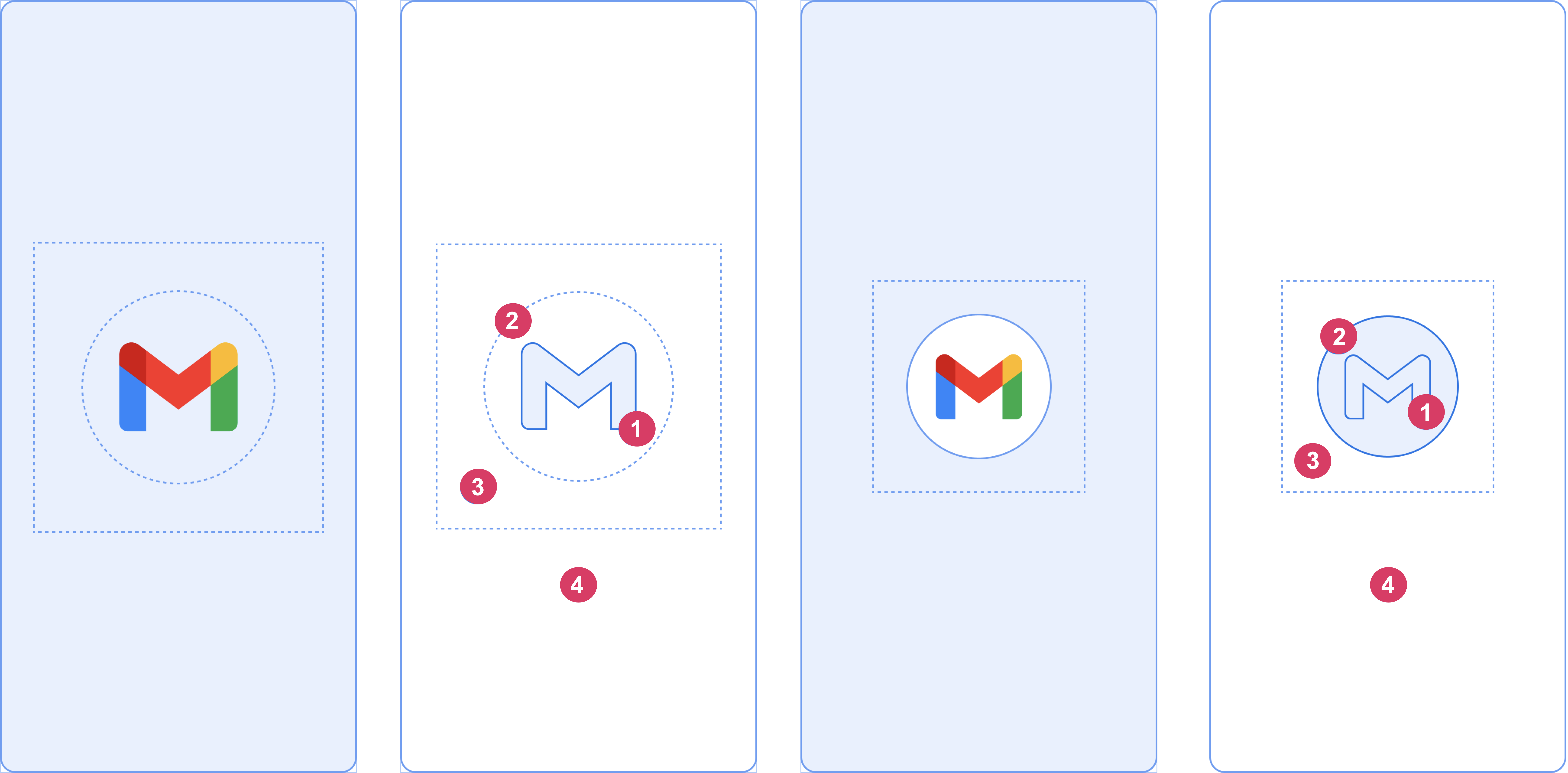
Be aware of the following considerations regarding these elements:
-
imageparameter. By default, the launcher icon is used:- App icon without an icon background, as shown on the left: This should be 1152×1152 pixels, and fit within a circle 768 pixels in diameter.
- App icon with an icon background, as shown on the right: This should be 960×960 pixels, and fit within a circle 640 pixels in diameter.
-
icon_background_coloris optional, and is useful if you need more contrast between the icon and the window background. -
One-third of the foreground is masked.
-
colorthe window background consists of a single opaque color.
PLEASE NOTE: The splash screen may not appear when you launch the app from Android Studio on API 31. However, it should appear when you launch by clicking on the launch icon in Android. This seems to be resolved in API 32+.
PLEASE NOTE: There are a number of reports that non-Google launchers do not display the launch image correctly. If the launch image does not display correctly, please try the Google launcher to confirm that this package is working.
PLEASE NOTE: The splash screen does not appear when you launch the app from a notification. Apparently this is the intended behavior on Android 12: core-splashscreen Icon not shown when cold launched from notification.
Flavor Support
If you have a project setup that contains multiple flavors or environments, and you created more than one flavor this would be a feature for you.
Instead of maintaining multiple files and copy/pasting images, you can now, using this tool, create different splash screens for different environments.
Pre-requirements
In order to use this feature, and generate the desired splash images for your app, a couple of changes are required.
If you want to generate just one flavor and one file you would use either options as described in Step 1. But in order to setup the flavors, you will then be required to move all your setup values to the flutter_native_splash.yaml file, but with a prefix.
Let's assume for the rest of the setup that you have 3 different flavors, Production, Acceptance, Development.
First thing you will need to do is to create a different setup file for all 3 flavors with a suffix like so:
flutter_native_splash-production.yaml
                flutter_native_splash-acceptance.yaml
                flutter_native_splash-development.yaml
You would setup those 3 files the same way as you would the one, but with different assets depending on which environment you would be generating. For example:
# flutter_native_splash-development.yaml
                flutter_native_splash:
                  color: "#ffffff"
                  image: assets/logo-development.png
                  branding: assets/branding-development.png
                  color_dark: "#121212"
                  image_dark: assets/logo-development.png
                  branding_dark: assets/branding-development.png

                  android_12:
                    image: assets/logo-development.png
                    icon_background_color: "#ffffff"
                    image_dark: assets/logo-development.png
                    icon_background_color_dark: "#121212"

                  web: false

                # flutter_native_splash-acceptance.yaml
                flutter_native_splash:
                  color: "#ffffff"
                  image: assets/logo-acceptance.png
                  branding: assets/branding-acceptance.png
                  branding_bottom_padding: 24
                  color_dark: "#121212"
                  image_dark: assets/logo-acceptance.png
                  branding_dark: assets/branding-acceptance.png

                  android_12:
                    image: assets/logo-acceptance.png
                    icon_background_color: "#ffffff"
                    image_dark: assets/logo-acceptance.png
                    icon_background_color_dark: "#121212"

                  web: false

                # flutter_native_splash-production.yaml
                flutter_native_splash:
                  color: "#ffffff"
                  image: assets/logo-production.png
                  branding: assets/branding-production.png
                  branding_bottom_padding: 24
                  color_dark: "#121212"
                  image_dark: assets/logo-production.png
                  branding_dark: assets/branding-production.png

                  android_12:
                    image: assets/logo-production.png
                    icon_background_color: "#ffffff"
                    image_dark: assets/logo-production.png
                    icon_background_color_dark: "#121212"

                  web: false
Note: these are just example values. You should substitute them with real values.
One by one
If you'd like to generate only a single flavor (maybe you are testing something out), you can use only the single command like this:
# If you have a flavor called production you would do this:
                dart run flutter_native_splash:create --flavor production

                # For a flavor with a name staging you would provide it's name like so:
                dart run flutter_native_splash:create --flavor acceptance

                # And if you have a local version for devs you could do that:
                dart run flutter_native_splash:create --flavor development
More than one
You also have the ability to specify all the flavors in one command as shown bellow:
dart run flutter_native_splash:create --flavors development,staging,production
Note: the available flavors need to be comma separated for this option to work.
All flavors
And if you have many different flavors available in your project, and wish to generate the splash screen for all of them, you can use this command (starting from 2.4.4):
dart run flutter_native_splash:create --all-flavors
                # OR you can use the shorthand option
                dart run flutter_native_splash:create -A
This will take all files from the root of the project, scan through them and match for the pattern flutter_native_splash-*.yaml where the value at the place of the star will be used as the flavor name and will be consumed to generate the files.
Android setup
You're done! No, really, Android doesn't need any additional setup.
Note: If it didn't work, please make sure that your flavors are named the same as your config files, otherwise the setup will not work.
iOS setup
iOS is a bit tricky, so hang tight, it might look scary but most of the steps are just a single click, explained as much as possible to lower the possibility of mistakes.
When you run the new command, you will need to open xCode and follow the steps bellow:
Assumption
- In order for this setup to work, you would already have 3 different
schemessetup; production, acceptance and development.
Preparation
- Open the iOS Flutter project in Xcode (open the Runner.xcworkspace)
- Find the newly created Storyboard files at the same location where the original is
{project root}/ios/Runner/Base.lproj - Select all of them and drag and drop into Xcode, directly to the left hand side where the current LaunchScreen.storyboard is located already
- After you drop your files there Xcode will ask you to link them, make sure you select 'Copy if needed'
- This part is done, you have linked the newly created storyboards in your project.
xCode
Xcode still doesn't know how to use them, so we need to specify for all the current flavors (schemes) which file to use and to use that value inside the Info.plist file.
- Open the iOS Flutter project in Xcode (open the Runner.xcworkspace)
- Click the Runner project in the top left corner (usually the first item in the list)
- In the middle part of the screen, on the left side, select the Runner target
- On the top part of the screen select Build Settings
- Make sure that 'All' and 'Combined' are selected
- Next to 'Combine' you have a '+' button, press it and select 'Add User-Defined Setting'
- Once you do that Xcode will create a new variable for you to name. Suggestion is to name it
LAUNCH_SCREEN_STORYBOARD - Once you do that, you will have the option to define a specific name for each flavor (scheme) that you have defined in the project. Make sure that you input the exact name of the LaunchScreen.storyboard that was created by this tool
- Example: If you have a flavor Development, there is a Storyboard created name LaunchScreenDevelopment.storyboard, please add that name (without the storyboard part) to the variable value next to the flavor value
- After you finish with that, you need to update Info.plist file to link the newly created variable so that it's used correctly
- Open the Info.plist file
- Find the entry called 'Launch screen interface file base name'
- The default value is 'LaunchScreen', change that to the variable name that you create previously. If you follow these steps exactly, it would be LAUNCH_SCREEN_STORYBOARD, so input this
$(LAUNCH_SCREEN_STORYBOARD) - And your done!
Congrats you finished your setup for multiple flavors,
FAQs
I got the error 'module flutter_native_splash' not found.
You may need to run the pod install command in your app's ios folder.
I got the error "A splash screen was provided to Flutter, but this is deprecated."
This message is not related to this package but is related to a change in how Flutter handles splash screens in Flutter 2.5. It is caused by having the following code in your android/app/src/main/AndroidManifest.xml, which was included by default in previous versions of Flutter:
<meta-data
                 android:name="io.flutter.embedding.android.SplashScreenDrawable"
                 android:resource="@drawable/launch_background"
                 />
The solution is to remove the above code. Note that this will also remove the fade effect between the native splash screen and your app.
Are animations/lottie/GIF images supported?
GIFs are now supported on web. Lotties are not yet supported. PRs are always welcome!
I got the error AAPT: error: style attribute 'android:attr/windowSplashScreenBackground' not found
This attribute was added in Android 12, so if you are getting this error, it means your project is not fully set up for Android 12+. Did you update your app's build configuration?
I see a flash of the wrong splash screen on iOS
This is caused by an iOS splash caching bug, which can be solved by uninstalling your app, powering off your device, power back on, and then try reinstalling.
I see a white screen between splash screen and app
- It may be caused by an iOS splash caching bug, which can be solved by uninstalling your app, powering off your device, power back on, and then try reinstalling.
- It may be caused by the delay due to initialization in your app. To solve this, use the
preserveandremovecalls to keep the splash on screen while your app initializes.
Can I base light/dark mode on app settings?
No. This package creates a splash screen that is displayed before Flutter is loaded. Because of this, when the splash screen loads, internal app settings are not available to the splash screen. Unfortunately, this means that it is impossible to control light/dark settings of the splash from app settings.
Notes
-
If the splash screen was not updated correctly on iOS or if you experience a white screen before the splash screen, run
flutter cleanand recompile your app. If that does not solve the problem, delete your app, power down the device, power up the device, install and launch the app as per this StackOverflow thread. -
This package modifies
launch_background.xmlandstyles.xmlfiles on Android,LaunchScreen.storyboardandInfo.pliston iOS, andindex.htmlon Web. If you have modified these files manually, this plugin may not work properly. Please open an issue if you find any bugs.
How it works
Android
- Your splash image will be resized to
mdpi,hdpi,xhdpi,xxhdpiandxxxhdpidrawables. - An
<item>tag containing a<bitmap>for your splash image drawable will be added inlaunch_background.xml - Background color will be added in
colors.xmland referenced inlaunch_background.xml. - Code for full screen mode toggle will be added in
styles.xml. - Dark mode variants are placed in
drawable-night,values-night, etc. resource folders.
iOS
- Your splash image will be resized to
@3xand@2ximages. - Color and image properties will be inserted in
LaunchScreen.storyboard. - The background color is implemented by using a single-pixel png file and stretching it to fit the screen.
- Code for hidden status bar toggle will be added in
Info.plist.
Web
- A
web/splashfolder will be created for splash screen images and CSS files. - Your splash image will be resized to
1x,2x,3x, and4xsizes and placed inweb/splash/img. - The splash style sheet will be added to the app's
web/index.html, as well as the HTML for the splash pictures.
Acknowledgments
This package was originally created by Henrique Arthur and is now maintained by Jon Hanson.
Bugs or Requests
If you encounter any problems feel free to open an issue. If you feel the library is missing a feature, please raise a ticket. Pull request are also welcome.
Changelog
[2.4.6] - (2025-Apr-06)
- Ensure compatibility with Java 21. Thanks Fichtelcoder for PR #759.
- Sets Android namespace. Fixes #755.
[2.4.5] - (2025-Feb-16)
- Updated readme. Closes #765. Thanks Jason for PR #767.
- Fixes for Swift Package Manager. Thanks Dimas for PR #762 and Maarten for PR #760.
- Updated dependencies.
[2.4.4] - (2024-Dec-29)
- Added the ability to generate all flavors with a single flag. Closes #751
- Update the docs to clarify dark mode parameters. Closes #720.
[2.4.3] - (2024-Nov-17)
- Add Swift Package Manager support. Closes #749.
- Update example to use Kotlin.
[2.4.2] - (2024-Oct-20)
- Updated dependencies.
- Clarified documentation. Closes #743.
[2.4.1] - (2024-Jun-07)
- Added support for bottom padding of branding image. Thanks Mudassir for PR #709. Closes #694.
- Updated dependencies.
- Corrected comment in template. Closes #705.
[2.4.0] - (2024-Mar-17)
- Migrate from js to js_interop. Closes #676. Closes #671.
[2.3.13] - (2024-Feb-18)
- Added better exception handling based on this comment. Thanks BujusKrachus for the detailed explanation.
[2.3.12] - (2024-Feb-18)
- Fix incorrect rejection of parameter values. Fixes #652.
- Updated dependencies.
[2.3.11] - (2024-Feb-14)
- Updated dependencies.
[2.3.10] - (2024-Jan-28)
- Fixed parameter
background_image_android. Fixes #652. - Exit process with error code when unexpected config provided in YAML. Thanks smit-ghl for PR #657.
- Updated readme. Thanks Mercutio1243 for the suggestions. Closes #658.
[2.3.9] - (2023-Dec-31)
- Resolve lint warnings. Update readme.
[2.3.8] - (2023-Dec-07)
- Make functions private that should not be public.
[2.3.7] - (2023-Dec-06)
[2.3.6] - (2023-Nov-20)
- Add fade between splash and app on web. Thanks eggp for the suggestion and example code. Closes #608.
- Add check of parameter names to catch user typos in the parameters.
[2.3.5] - (2023-Oct-29)
[2.3.4] - (2023-Oct-16)
[2.3.3] - (2023-Oct-02)
- Updated dependencies.
[2.3.2] - (2023-Aug-13)
- Update the example.
- Update the
environmentvalue in thepubspec.yaml.
[2.3.1] - (2023-Jun-04)
- Package speed up using Isolates to generate files at the same time. Thanks Vladimir for PR #558.
- New command for generating all flavors at once: --flavors
- Replaced deprecated 'flutter pub run' with 'dart run'. Thanks Aditya for PR #554.
- Fix fullscreen switch not working for Android <12v in System.dark mode. Fixes #559.
[2.3.0] - (2023-May-15)
- Support for GIFs in splash screen for web. Thanks OutdatedGuy for PR #547.
- Using inline css & js in index.html to decrease load time. Thanks OutdatedGuy for PR #548.
- Update example app for Flutter 3.10. Thanks OutdatedGuy for PR #551.
- Replaced deprecated code with suggested ones. Thanks OutdatedGuy for PR #550.
- Update ci.yaml with latest flutter CLI commands. Thanks OutdatedGuy for PR #552.
- Fix compatibility with AGP 8.0. Thanks Aljoscha for PR #545.
- Migrate to systemUIMode. Thanks Milind for PR #534.
[2.2.19] - (2023-Mar-05)
- Refresh the example with the latest version of Flutter.
- Fix Notification bar incorrectly still showing on Xiaomi devices. Fixes #517.
- Updated dependencies.
[2.2.18] - (2023-Feb-19)
- Remove
v31/styles.xmlfiles if not in use. Fixes #514. - Remove web changes on
removecommand. Fixes #516.
[2.2.17] - (2023-Jan-15)
- Updated image dependency to v4.0.10. Fixes #497.
- Changed image processing from linear to cubic to improve image quality. Fixes #472.
[2.2.16] - (2022-Nov-27)
- Update documentation on Android 12.
- Fix web background image. Thanks Severin for PR #459.
- Support more image formats. Thanks Severin for PR #460.
[2.2.15] - (2022-Nov-20)
- Fix iOS background image build incorrectly when background dark image is used. Fixes #452, fixes #439.
- Correct background image/color handling on web. Fixes #450, fixes 324.
- Don't include dark styling in web if not specified in config. Fixes #453.
- Add _Parameters class to hold parameters.
[2.2.14] - (2022-Nov-07)
- Don't update
values-31if there is noandroid_12section in the config. Closes #447. - Additional fix for index.html getting extra blank lines. Fixes #430.
[2.2.13] - (2022-Oct-30)
- Corrected Android 12 dark parameters not defaulting to light parameters. Thanks elliotrtd for the heads up on this issue.
[2.2.12] - (2022-Oct-23)
- Updated readme and dependancies.
- Add CI, resolve some lints, and fix tests. Thanks lsaudon for PR #433.
[2.2.11] - (2022-Oct-09)
- Fixed Android 11 color issue. Fixes #429.
- Fix index.html getting extra blank lines. Fixes #430.
- Update the readme. Closes #431.
[2.2.10+1] - (2022-Sep-25)
- Update bug report template.
- Package housekeeping to stay up to date with Flutter.
[2.2.9] - (2022-Sep-07)
- Update pub.dev links. Thanks Joachim for PR #415.
- Fix Android 12 branding issue. Thanks Matías for PR #414.
- Corrected copyright notice. Closes #416.
- Added Android 12 example. Closes #412.
[2.2.8] - (2022-Aug-21)
- Use Theme.Light.NoTitleBar. Fixes #402.
- Correct android spelling in readme. Thanks Muhammad for PR #407.
- Use html parser. Thanks OutdatedGuy for PR #396.
- Separate branding property for Android 12. Closes #405.
[2.2.7] - (2022-July-31)
- Remove branding on Android 12 if branding is not specified. Fixes #399.
[2.2.6] - (2022-July-24)
- Fix parseColor test. Thanks mihiro for PR #393.
- Fix branding image source link broken and optimized code with optional chaining operator. Thanks OutdatedGuy for PR #394 and PR #395.
[2.2.5] - (2022-July-17)
- Added Branding Image support for the web platform. Thanks OutdatedGuy for PR #386.
- Fix android12 config name. Thanks mihiro for PR #390.
[2.2.4] - (2022-July-03)
- Added parameters for platform-specific images. Closes #375.
- Remove black status bar which appeared on Android devices with a notch. Fixes #311.
[2.2.3+1] - (2022-June-12)
- Updated readme.
[2.2.3] - (2022-June-5)
- Create new storyboard file rather than try to modify existing file. Closes #369.
- Reverted 2.1.6 change of using light settings for dark mode if omitted. Fixes #368.
[2.2.2] - (2022-May-29)
- Corrected Android 12 color overriding color parameter. Closes #365.
- Add support for setting screen orientation in Android. Closes #344.
[2.2.1] - (2022-May-22)
- Updated dependencies. Closes #358.
- Added Android 12 background color support. Closes #357.
- Resolve exception that occurs when using remove command. Closes #355.
[2.2.0+1] - (2022-May-15)
- Added flavor support. Thanks Vladimir for PR #316! Closes #160.
- Fix androidV31StylesXml not being generated when darkBackgroundImage is set. Thanks (Hallot)[https://github.com/Hallot] for PR #349.
- Fix incorrect android_12 check for image_dark. Closes #347.
- Fix Flutter v3 WidgetsBinding.Instance! Null check warning. Closes #351.
[2.1.6] - (2022-Apr-17)
- Use light settings for dark mode if dark mode settings are omitted.
- Add ALT tag for web. Fixes #339.
[2.1.5] - (2022-Apr-10)
- Thanks Yousef for PR #332 adding stricter lint rules and zuboje for PR #334 adding deprecated message.
[2.1.3+1] - (2022-Apr-03)
[2.1.2+1] - (2022-Mar-27)
- Add branding support in Android 12. Thanks Vladimir for the PR.
- Updated readme. Closes #317. Closes #318.
- Don't create a blank branding image set. Fixes #264.
[2.1.1] - (2022-Mar-13)
- Fix for pixelated splash image on web. Fixes #263.
[2.1.0] - (2022-Mar-06)
[2.0.5] - (2022-Feb-20)
- Converted to a plugin since there is now platform specific code.
[2.0.4] - (2022-Feb-15)
- Fix Error: Not found: 'dart:js' error. Fixes #292.
[2.0.3+1] - (2022-Feb-14)
- Added preserve() and remove() methods.
- Remove splash from DOM in web.
[2.0.2] - (2022-Feb-07)
- Update existing styles xml to support Xiaomi/Redmi devices. Fixes #285, fixes #281.
- Avoid changing logo size on mobile browsers. Fixes #276.
[2.0.1+1] - (2022-Jan-29)
- Provide BuildContext argument to the initialization function.
[2.0.0] - (2022-Jan-29)
- BREAKING CHANGE: Added
removeAftermethod which allows the native splash to remain until an initialization routine is complete. In order to use this method, theflutter_native_splashdependency must be moved fromdev_dependenciestodependencies. Thanks Ahmed for the tip. Closes #271.
[1.3.3] - (2022-Jan-01)
- Merged PR that adds branding. Thanks Faiizii for PR. Closes #256.
- Updated readme. Closes #258.
- Fix so that the splash screen does not cover the app in web. Fixes 253.
- Updates per linter rules.
[1.3.2] - (2021-Nov-28)
- Updated readme. Hide splash image in web from screen readers. Closes #231.
[1.3.1] - (2021-Oct-27)
- Don't create Android 12 night res files if dark mode is not configured. Fixes #227.
Removecommand takes dark mode into account.
[1.3.0] - (2021-Oct-26)
[1.2.4] - (2021-Sep-23)
- Updated readme. Thanks @j-j-gajjar for PR #216.
- Remove references to background images in web when images are missing. Fixes #196.
- Updated dependencies.
[1.2.3] - (2021-Sep-08)
- Reverted XML dependency to be compatible with stable Flutter branch. Closes #206.
[1.2.2] - (2021-Sep-06)
- Added a FAQ to address the deprecation of
SplashScreenDrawable. Closes #199. - Added
<picture>tag toindex.htmlby finding the</body>tag instead ofsrc="main.dart.js, which was removed in Flutter 2.5. Fixes #202. - Added
<item name="android:forceDarkAllowed">false</item>tag to dark modestyles.xmlto improve Xiaomi support. Closes #184.
[1.2.1] - (2021-Jul-19)
- Check the file type and exit with error if it is not a PNG.
- Updated documentation with more FAQs.
- Fixed bug that was preventing copying of images for web. Fixes #192.
- Changed the example to show a secondary splash screen.
- Check that android, web, and ios folders exist before updating respective splash screen.
[1.2.0] - (2021-Jun-09)
- Added beta support for Android 12. Closes #175.
[1.1.9] - (2021-Jun-09)
- Added path argument to command line. Thanks @lyledean1 for PR #180.
[1.1.8+4] - (2021-Apr-20)
- Fixed bug that was preventing copying of dark background. Fixes #163.
[1.1.7+1] - (2021-Apr-02)
- flutter_native_splash:remove adheres to android/ios/web setting. Fixes #159.
- Updated readme images.
[1.1.6+1] - (2021-Mar-29)
- Corrected Android scaling. Thanks @chris-efission.
- Updated readme image.
[1.1.5+1] - (2021-Mar-23)
- Added unit tests.
- Updated dependency.
[1.1.4+1] - (2021-Mar-18)
- Fixed bug that created duplicate android:windowFullscreen tags in styles.xml. Closes #147.
- Fixed fullscreen in Android dark mode.
- Print errors instead of throwing exceptions for cleaner output.
- Added message for missing subviews in iOS LaunchScreen.storyboard. Fixes #146.
- Removed duplicate exceptions for missing image file since that is now checked at package start.
[1.1.3] - (2021-Mar-18)
- Fixed bug that was giving error on copying background image. Closes #144.
[1.1.2] - (2021-Mar-17)
- Check that image files exist before starting. Throw an exception if image file not found.
[1.1.1+1] - (2021-Mar-16)
- Create Styles.css before writing to it. Closes #141
- Make all file calls synchronously to make code cleaner.
[1.1.0] - (2021-Mar-15)
- Added option for background image. Closes #22.
[1.0.3] - (2021-Mar-05)
- Updated readme.
[1.0.2] - (2021-Mar-04)
- Added exception for missing/renamed splash image in LaunchScreen.storyboard.
[1.0.1+1] - (2021-Mar-02)
- Corrected location of
picturetag in web to ensure that splash disappears. Thanks Dawid Dziurla.
[1.0.0] - (2021-Feb-19)
- Adds null safety. Closes #127.
[0.3.0] - (2021-Feb-10)
- Added support for web. Closes #30.
- Updated the example app to include web.
[0.2.11] - (2021-Feb-09)
- Fixed
removecommand which was leaving splash images in place.
[0.2.10] - (2021-Feb-08)
- Replaced
android_fullscreenwithfullscreenparameter, adding iOS support. closes #75, closes #65. - The package no longer modifies the AppDelegate. Fixes #125, fixes #66.
- Added
removecommand. Closes #97, closes #126. - Updated docs.
[0.2.9] - (2021-Jan-27)
[0.2.8] - (2021-Jan-25)
- Allow users to set Android gravity and iOS ContentMode directly.
- Parse LaunchScreen.storyboard with XML package for more reliability.
- Updated install instructions.
- Fixes #18. Closes #63.
[0.2.7] - (2021-Jan-18)
- Added configuration parameter to specify the info.plist location(s).
- Updated documentation.
- Fixes #120, #42.
[0.2.6] - (2021-Jan-14)
- Added support for Android -v21 resource folders, which appear in the Flutter beta channel.
- Parse launch_background.xml with XML package for more reliability.
- Fixes #104, #118.
[0.2.5] - (2021-Jan-13)
- Handle color parameter that are passed as integers. Fixes #103
[0.2.4] - (2021-Jan-12)
- Update code that adds fullscreen mode to Android so that it selects the right style (LaunchTheme) in styles.xml. This should resolve #39, #54, #67, #92, #112, and #117.
- Removed code that modifies MainActivity as it is not longer needed since Flutter embedding V2 uses two styles in styles.xml so full screen is set independently in the style.
[0.2.3] - (2021-Jan-11)
- Further modifications to raise pub points: The public API's need to have dartdoc comments, so all public declarations that did not need to be public were changed to private. Added doc comments for public APIs.
[0.2.2] - (2021-Jan-09)
- Corrected color of background PNG for iOS. (The channel order of a uint32 encoded color is BGRA.) (#115)
[0.2.1] - (2021-Jan-08)
- Modifications to raise pub points: Adherence to Pedantic code standard, and conditional imports to avoid losing points for lack of multiple platform support.
[0.2.0+1] - (2021-Jan-08)
- Updated version number in README.md (thanks @M123-dev)
[0.2.0] - (2021-Jan-07)
- Added dark mode.
[0.1.9] -
- (2020-Jan-27) Added createSplashByConfig for external usage
- (2020-Jan-05) Fix run the package command (thanks @tenhobi)
- (2019-Oct-31) Removing comments from the example (thanks @lucalves)
- (2019-Oct-16)
imageparameter is now optional (#26)
[0.1.8+4] - (12th October 2019)
- Fix bug on RegEx preventing
packagetag from being found inAndroidManifest.xml(#25)
[0.1.8+3] - (4th October 2019)
- Prevent unhandled int exception in
colorargument (thanks @wemersonrv - PR #23)
[0.1.8+2] - (16th September 2019)
- Fix code being added multiple times to
MainActivity(#19)
[0.1.8+1] - (16th September 2019)
- Documentation improvements
[0.1.8] - (16th September 2019)
- Added
fillproperty to use full screen images on Android (thanks @Bwofls2 - PR #8) - Added
android_disable_fullscreenproperty to disable opening app in full screen on Android (#14) - Status bar color on Android is now generated dynamically by using same principles as Material Design (thanks @yiss - PR #16)
[0.1.7+2] - (1th September 2019)
- Fix a bug on
minSdkVersionreading (#13)
[0.1.7+1] - (1th September 2019)
- Check for
minSdkVersion>= 21 to add code for changing status bar color to transparent (#12)
[0.1.7] - (27th August 2019)
- Fix a bug that duplicates entries on
Info.plistwhen using multiple</dict>on iOS (#5) - Fix missing imports on
MainActivitywhen not using default class signature (#7)
[0.1.6+2] - (27th August 2019)
- Yup, I released a new version because a quote was missing
[0.1.6+1] - (27th August 2019)
- Updated README.md adding quotes on
colorproperty - Add support for colors with
#prefix
[0.1.6] - (26th August 2019)
- Fix bug where
MainActivityfile could not be found with custom package names
[0.1.5] - (26th August 2019)
- Add support for Kotlin
- Add support for Swift
- Add
awaitto every step to create splash screen on Android and iOS to prevent async steps causing error
[0.1.4] - (25th August 2019)
- Fix code style issues pointed by
dartanalzyer - Fix typo in README.md
[0.1.3] - (25th August 2019)
- Update README.md
[0.1.2] - (25th August 2019)
- Fix Travis CI filename
[0.1.1] - (25th August 2019)
- Added Travis CI and updates to README.md
[0.1.0] - (25th August 2019)
- Initial release: generate Android and iOS splash screens with a background color and an image