
in_app_review
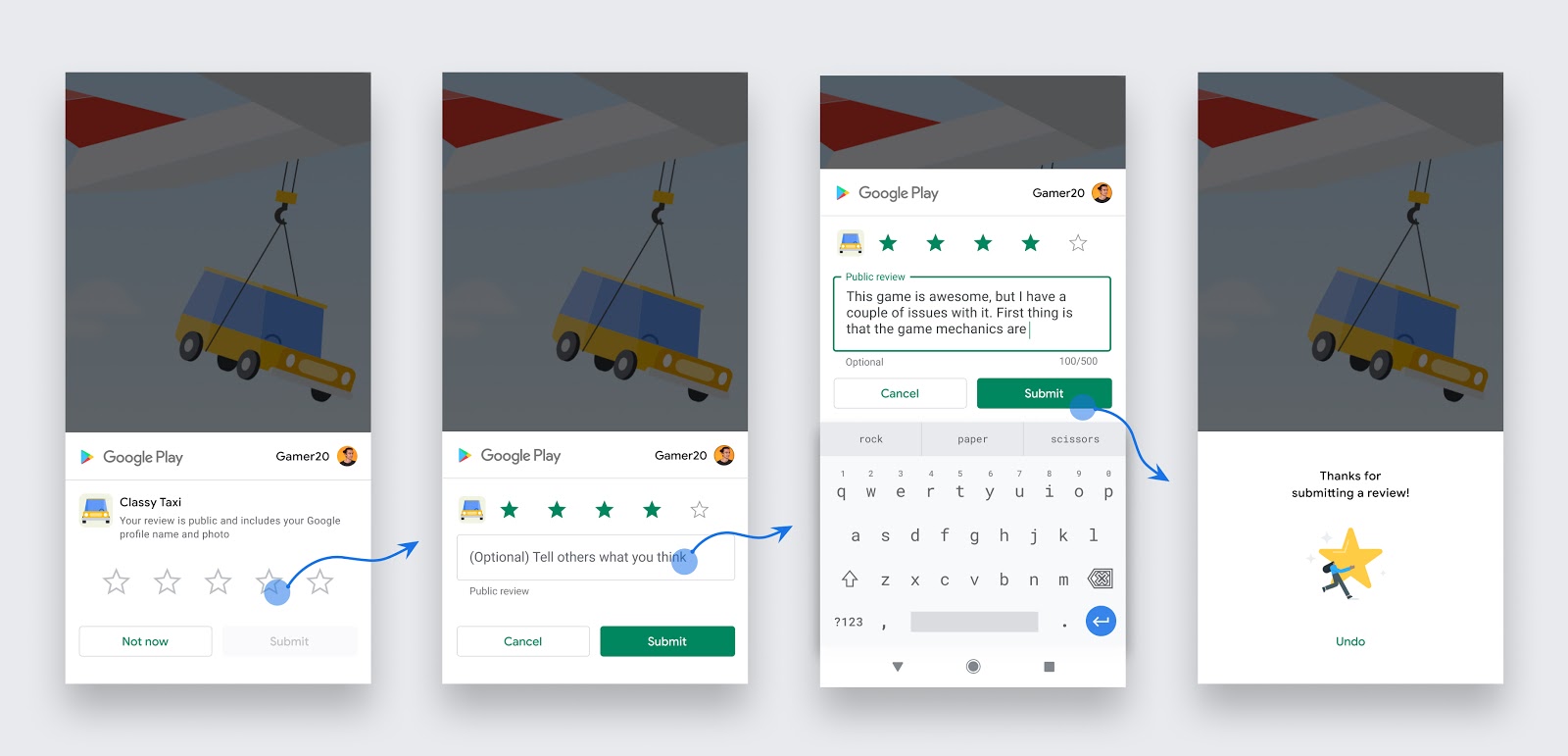
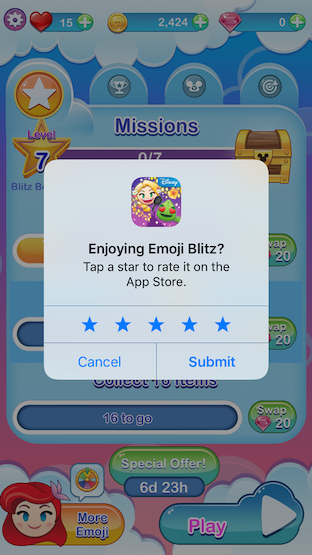
v2.0.12Flutter plugin for showing the In-App Review/System Rating pop up on Android, iOS and MacOS. It makes it easy for users to rate your app.
Package archive: https://pubdev.letsnova.ru/api/archives/in_app_review/2.0.12.tar.gz
dart pub add in_app_reviewReadme
in_app_review


Description
A Flutter plugin that lets you show a review pop up where users can leave a review for your app without needing to close your app. Alternatively, you can open your store listing via a deep link.
It uses the In-App Review API on Android and requestReview on iOS/MacOS.
Usage
requestReview()
The following code triggers the In-App Review prompt. This should not be used frequently as the underlying API's enforce strict quotas on this feature to provide a great user experience.
import 'package:in_app_review/in_app_review.dart';

                final InAppReview inAppReview = InAppReview.instance;

                if (await inAppReview.isAvailable()) {
                    inAppReview.requestReview();
                }
Do
- Use this after a user has experienced your app for long enough to provide useful feedback, e.g., after the completion of a game level or after a few days.
- Use this sparingly otherwise no pop up will appear.
Avoid
- Triggering this via a button in your app as it will only work when the quota enforced by the underlying API has not been exceeded. (Android)
- Interrupting the user if they are mid way through a task.
Testing requestReview() on Android isn't as simple as running your app via the emulator or a physical device. See Testing for more info.
openStoreListing()
The following code opens the Google Play Store on Android, the App Store with a review screen on iOS & MacOS and the Microsoft Store on Windows. Use this if you want to permanently provide a button or other call-to-action to let users leave a review as it isn't restricted by a quota.
import 'package:in_app_review/in_app_review.dart';

                final InAppReview inAppReview = InAppReview.instance;

                inAppReview.openStoreListing(appStoreId: '...', microsoftStoreId: '...');
appStoreId is only required on iOS and MacOS and can be found in App Store Connect under General > App Information > Apple ID.
microsoftStoreId is only required on Windows.
Guidelines
https://developer.android.com/guide/playcore/in-app-review#when-to-request https://developer.android.com/guide/playcore/in-app-review#design-guidelines
Since there is a quota on how many times the pop up can be shown, you should not trigger requestReview() via a button or other call-to-action option. Instead, you can reliably redirect users to your store listing via openStoreListing().
Testing (read carefully)
Android
You must upload your app to the Play Store to test requestReview(). The recommended approach is to build an app bundle and upload it via internal app sharing.
Real reviews can only be created when requestReview() is used from the production track. The submit button is disabled on other tracks and in internal app sharing to emphasize this.
If you get stuck here as many developers have, please refer to the troubleshooting table found below or the complete official instructions.
Troubleshooting table
| Issue | Solution |
|---|---|
| Your app is not published yet in the Play Store. | Your app doesn't have to be published to test, but your app's applicationID must be available at least in the internal testing track. |
| The user account can't review the app. | Your app must be in the user's Google Play library. To add your app to the user's library, download your app from the Play Store using that user's account. |
| The primary account is not selected in the Play Store. | When multiple accounts are available in the device, ensure that the primary account is the one selected in the Play Store. |
| The user account is protected (for example, with enterprise accounts). | Use a Gmail account instead. |
| The user has already reviewed the app. | Delete the review directly from Play Store. |
| The quota has been reached. | Use an internal test track or internal app sharing. |
| There is an issue with the Google Play Store or Google Play Services on the device. | This commonly occurs when the Play Store was sideloaded onto the device. Use a different device that has a valid version of the Play Store and Google Play Services. |
iOS
requestReview() can be tested via the iOS simulator or on a physical device.
Note that requestReview() will do nothing when testing via TestFlight as documented.
Similarly to Android, real reviews can only created when requestReview() is used in production. The submit button is disabled when testing locally to emphasize this.
openStoreListing() can only be tested with a physical device as the iOS simulator does not have the App Store installed.
MacOS
This plugin can be tested by running your MacOS application locally.
Cross Platform Compatibility
| Function | Android | iOS | MacOS | Windows |
|---|---|---|---|---|
isAvailable() |
✅ | ✅ | ✅ | ❌ |
requestReview() |
✅ | ✅ | ✅ | ❌ |
openStoreListing() |
✅ | ✅ | ✅ | ✅ |
Requirements
Android
Requires Android 5 Lollipop(API 21) or higher and the Google Play Store must be installed.
iOS
Requires iOS version 10.3
MacOS
Requires MacOS version 10.14
Issues & pull requests are more than welcome!
Changelog
[2.0.12]
- Fix an Android NullPointerException that sometimes occurred when apps were backgrounded.
[2.0.11]
- Regenerate the plugin & migrate Android platform code from Java to Kotlin
[2.0.10]
- Add a privacy manifest to iOS and MacOS.
- Add Swift Package Manager support.
- Update deprecated usage of
SKStoreReviewControlleron iOS and MacOS. - Update Android Play Core dependency to Play Review 2.0.2.
- Convert iOS Objective-C code back to Swift.
[2.0.9]
- Fix deprecated API warning on Android.
[2.0.8]
- Bump Kotlin version to 1.7.10
- Bump build gradle version to 7.3.0
- Bump compileSdkVersion to 33
[2.0.7]
- Adds a namespace for compatibility with AGP 8.0.
- Checks if Google Play Services are available on Android when using
isAvailable().
[2.0.6]
- Update Android Play Core dependency to Play Review 2.0.1.
[2.0.5]
- Migrate Android Play Core dependency to Play Review 2.0.0.
- Recreate the example app.
- Update in_app_review_platform_interface to 2.0.4
[2.0.4]
- Migrate maven repository from jcenter to mavenCentral
isAvailable()now returnsfalseon web.
[2.0.3]
- Fix iOS no-scene exception. (#41)
[2.0.2]
- Replace iOS Swift code with Objective-C to add compatibility with Objective-C Flutter apps.
[2.0.1]
- Fix rare null pointer exception on Android
- Fix MissingPluginException on MacOS
- Bump the minimum Dart SDK version from
2.12.0-0to2.12.0. - Bump the minimum Flutter version to
2.0.0. - Update in_app_review_platform_interface to 2.0.2
[2.0.0]
- Migrate to null safety.
[1.0.4]
- Update in_app_review_platform_interface to 1.0.5
- Remove dependency on
package_info. - Handle
openStoreListing()with native code for Android, iOS and MacOS.
[1.0.3]
- Update in_app_review_platform_interface to 1.0.4
- Update android compileSdkVersion to 29.
- Lower dependency version constraints.
[1.0.2]
- Update in_app_review_platform_interface to 1.0.3
- Open the App Store directly instead of via the Safari View Controller.
- Add automated tests.
- Improve docs.
[1.0.1+1]
- Update in_app_review_platform_interface to 1.0.2
[1.0.0]
- Migrate to use
in_app_review_platform_interface. - Add Windows support for
openStoreListing.
[0.2.1+1]
- Improve iOS testing docs.
[0.2.1]
- Update dependencies.
- Android Play Core Library V1.8.2 release notes:
- Fixed UI flickering in the In-App Review API
[0.2.0+4]
- Remove deprecated API warning.
- Update dependencies.
[0.2.0+3]
- Instructions in the README have been improved along with the example.
[0.2.0+2]
- Update changelog format
[0.2.0+1]
- Update MacOS testing instructions
[0.2.0] Breaking Change
- Add MacOS support
- Rename
openStoreListing(iOSAppStoreId: '')toopenStoreListing(appStoreId: '')
[0.1.0]
- Improve docs
- Set Android minSdkVersion to 16
- Refactor Android Plugin
[0.0.1]
Initial release