
live_activities
v2.4.2Support iOS Live Activities, Android RemoteViews and iPhone's Dynamic Island.
Package archive: https://pubdev.letsnova.ru/api/archives/live_activities/2.4.2.tar.gz
dart pub add live_activitiesReadme





A Flutter plugin that enables the use of Android (API level 24+) RemoteViews and iOS (16.1+) Live Activities, including support for the iPhone Dynamic Island features.
🧐 What is it ?
This plugin uses the iOS ActivityKit API and the Android RemoteViews API to create live activities on iOS and remote views on Android.
live_activities can be used to show dynamic live notification & implement dynamic island feature on iPhones that support it 🏝️
⚠️ live_activities is only intended to use with iOS 16.1+ or Android API 24+. It will simply do nothing prior these versions.
iOS
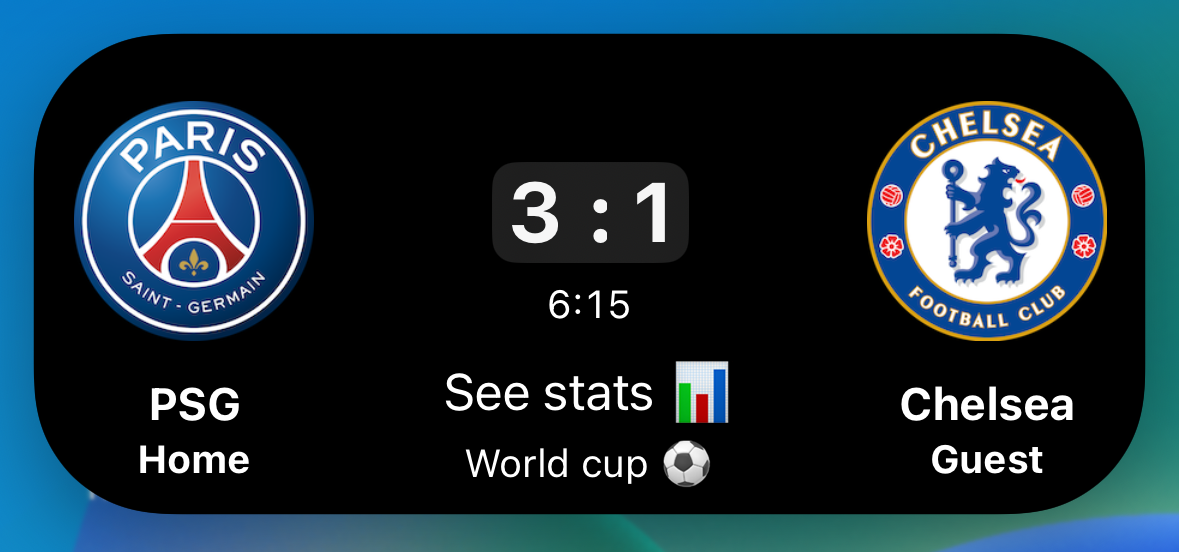
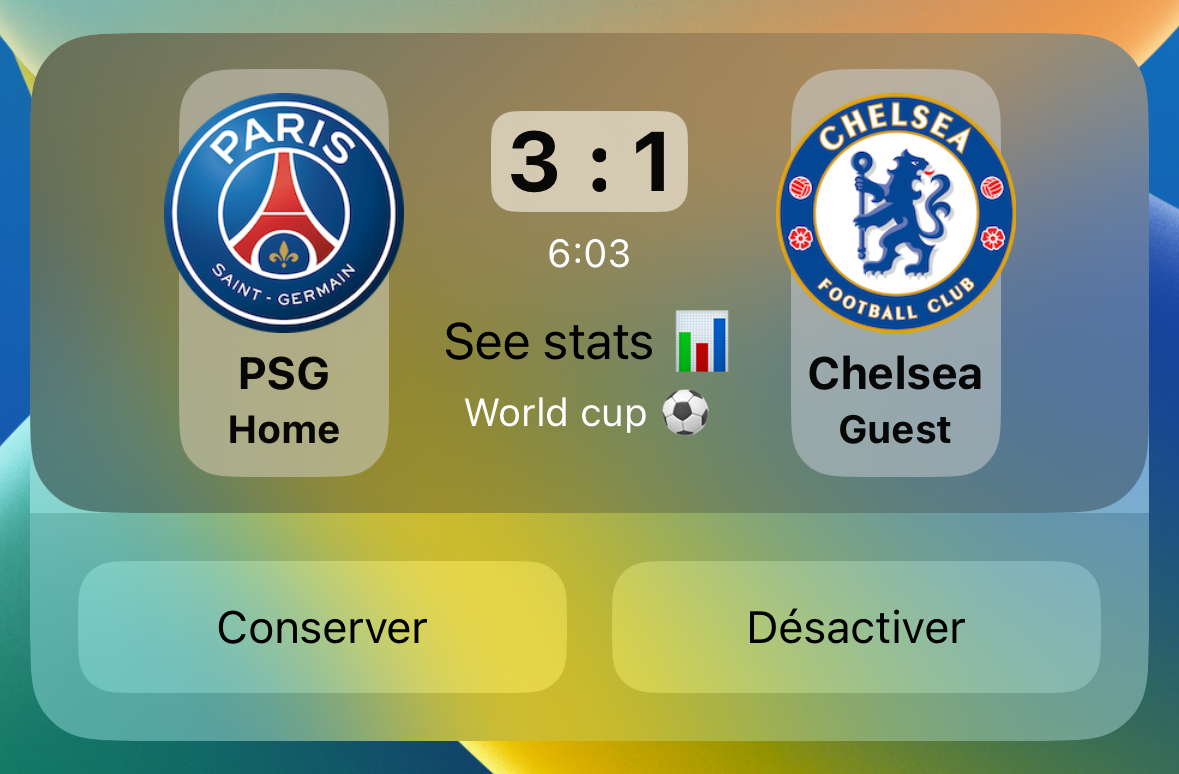


Android
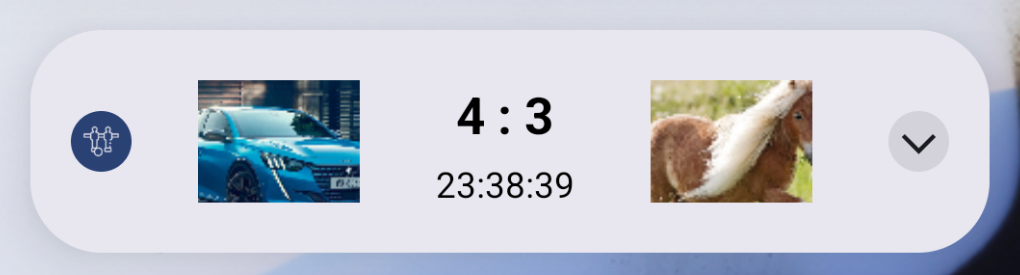
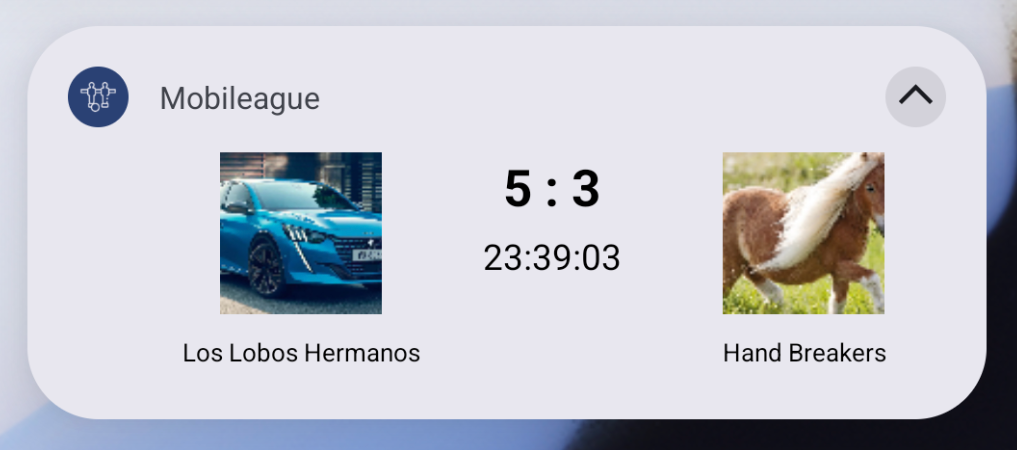
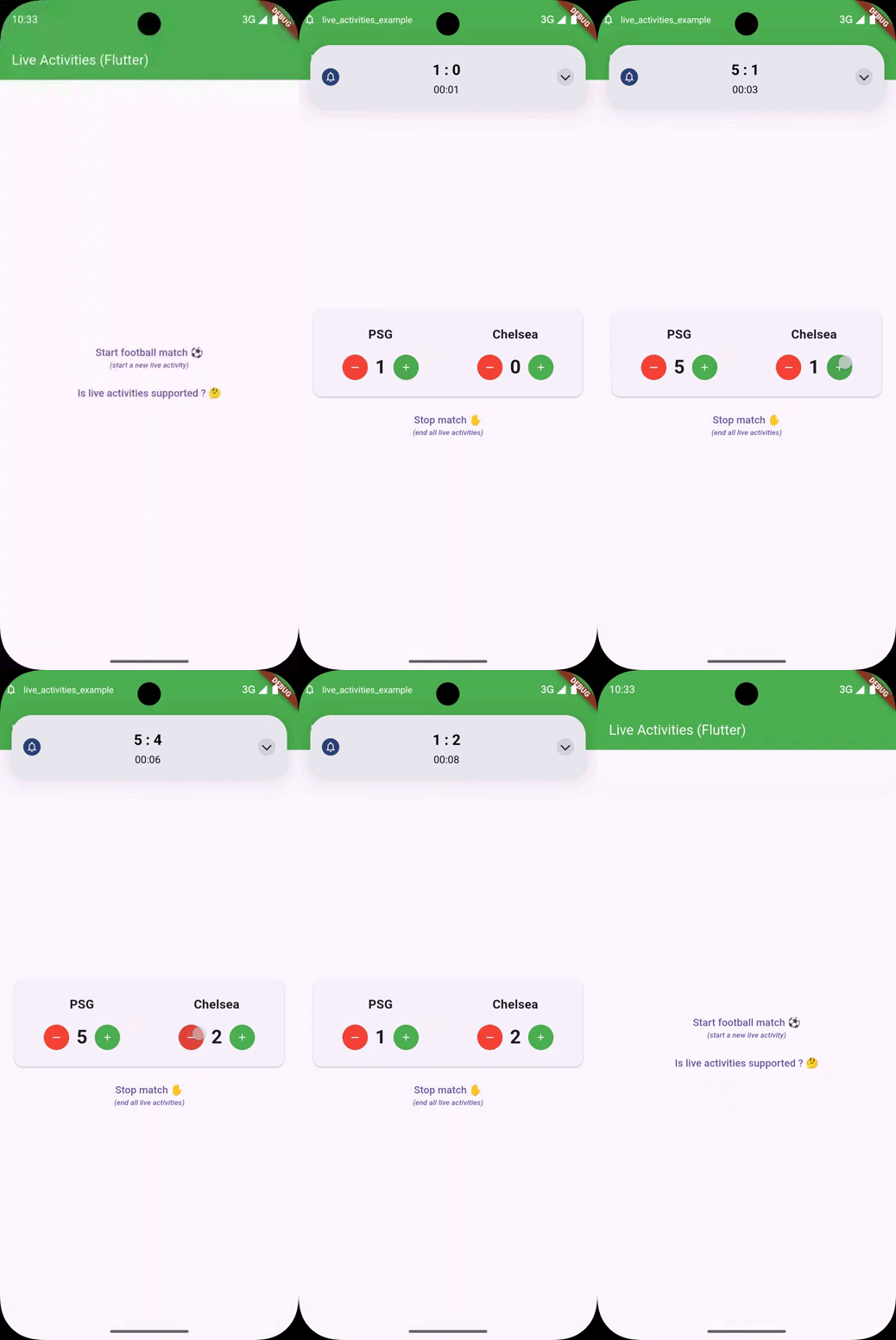
👻 Getting started
Due to technical restriction, it's not currently possible to only use Flutter 🫣.
iOS
You need to implement in your Flutter iOS project a Widget Extension & develop in Swift/Objective-C your own Live Activity / Dynamic Island design.
ℹ️ You can check into the example repository for a full example app using Live Activities & Dynamic Island
-
📱 Native
- Open the Xcode workspace project
ios/Runner.xcworkspace. - Click on
File->New->Target...- Select
Widget Extension& click on Next. - Specify the product name (e.g.,
MyAppWidget) and be sure to select " Runner" in "Embed in Application" dropdown. - Click on Finish.
- When selecting Finish, an alert will appear, you will need to click on Activate.
- Select

- Open the Xcode workspace project
-
Add the "Push Notifications" capabilities for the main
Runnerapp only!.
-
Enable live activity by adding this line in
Info.plistfor bothRunnerand yourWidget Extension.<key>NSSupportsLiveActivities</key> <true/>
-
Add the "App Group" capability for both
Runnerand your widget extension. After you add the capability, check the checkmark next to the text field that contains an identifier of the formgroup.example.myapp. This identifier will be used later and refered to asYOUR_GROUP_ID.
ℹ️ You can check on this resource or here for more native informations.
- Inside your extension
ExtensionNameLiveActivity.swiftfile, you need to create anActivityAttributescalled EXACTLYLiveActivitiesAppAttributes(if you rename, activity will be created but not appear!)
struct LiveActivitiesAppAttributes: ActivityAttributes, Identifiable {
                  public typealias LiveDeliveryData = ContentState // don't forget to add this line, otherwise, live activity will not display it.

                  public struct ContentState: Codable, Hashable { }

                  var id = UUID()
                }
- Create a Swift extension to handle prefixed keys at the end of the file.
extension LiveActivitiesAppAttributes {
                  func prefixedKey(_ key: String) -> String {
                    return "\(id)_\(key)"
                  }
                }
- Create an
UserDefaultswith your group id to access Flutter data in your Swift code.
// Create shared default with custom group
                let sharedDefault = UserDefaults(suiteName: "YOUR_GROUP_ID")!

                struct FootballMatchApp: Widget {
                  var body: some WidgetConfiguration {
                    ActivityConfiguration(for: LiveActivitiesAppAttributes.self) { context in
                      // create your live activity widget extension here
                      // to access Flutter properties:
                      let myVariableFromFlutter = sharedDefault.string(forKey: context.attributes.prefixedKey("myVariableFromFlutter"))!

                      // [...]
                    }
                  }
                }
Android
You need to implement in your Flutter Android project a CustomLiveActivityManager which will extends plugin one & develop in Kotlin / Java your own RemoveView logic and design.
Don't be afraid, you will just need to create one XML and one Kotlin files.
-
📱 Native
- Open your MainActivity.kt inside
android/app/src/main/kotlin/.../MainActivity.kt. - Give to
LiveActivityManagerHolderan instance ofLiveActivityManager, it will contain your logic. - Create the Kotlin file of your custom
LiveActivityManager. - Create the XML file of your custom
RemoteViewinsideandroid/app/src/main/res/layout/live_activity.xml.
- Open your MainActivity.kt inside
MainActivity.kt example:
package your.package.name

                import io.flutter.embedding.android.FlutterActivity
                import io.flutter.plugin.common.MethodChannel
                import io.flutter.embedding.engine.FlutterEngine

                import com.example.live_activities.LiveActivityManagerHolder

                class MainActivity : FlutterActivity() {
                    override fun configureFlutterEngine(flutterEngine: FlutterEngine) {
                        super.configureFlutterEngine(flutterEngine)

                        LiveActivityManagerHolder.instance = CustomLiveActivityManager(this)
                    }
                }
CustomLiveActivityManager.kt example:
package your.package.name

                import android.app.Notification
                import android.app.PendingIntent
                import android.content.Context
                import android.content.Intent
                import android.graphics.Bitmap
                import android.graphics.BitmapFactory
                import android.widget.RemoteViews
                import kotlinx.coroutines.Dispatchers
                import kotlinx.coroutines.withContext
                import java.net.HttpURLConnection
                import java.net.URL
                import com.example.live_activities.LiveActivityManager

                class CustomLiveActivityManager(context: Context) :
                    LiveActivityManager(context) {
                    private val context: Context = context.applicationContext
                    private val pendingIntent = PendingIntent.getActivity(
                        context, 200, Intent(context, MainActivity::class.java).apply {
                            flags = Intent.FLAG_ACTIVITY_REORDER_TO_FRONT
                        }, PendingIntent.FLAG_UPDATE_CURRENT or PendingIntent.FLAG_IMMUTABLE
                    )

                    private val remoteViews = RemoteViews(
                        context.packageName, R.layout.live_activity
                    )

                    // This function is not necessary
                    // This function will load an image from a URL and resize it to 64dp
                    suspend fun loadImageBitmap(imageUrl: String?): Bitmap? {
                        // Convert 64dp to pixels based on device density
                        val dp = context.resources.displayMetrics.density.toInt()

                        return withContext(Dispatchers.IO) {
                            if (imageUrl.isNullOrEmpty()) return@withContext null
                            try {
                                val url = URL(imageUrl)
                                val connection = url.openConnection() as HttpURLConnection
                                connection.doInput = true
                                connection.connectTimeout = 3000
                                connection.readTimeout = 3000
                                connection.connect()
                                connection.inputStream.use { inputStream ->
                                    // Decode the bitmap from the input stream and resize it
                                    val originalBitmap = BitmapFactory.decodeStream(inputStream)
                                    originalBitmap?.let {
                                        val targetSize = 64 * dp
                                        val aspectRatio =
                                            it.width.toFloat() / it.height.toFloat()
                                        val (targetWidth, targetHeight) = if (aspectRatio > 1) {
                                            targetSize to (targetSize / aspectRatio).toInt()
                                        } else {
                                            (targetSize * aspectRatio).toInt() to targetSize
                                        }
                                        Bitmap.createScaledBitmap(
                                            it,
                                            targetWidth,
                                            targetHeight,
                                            true
                                        )
                                    }
                                }
                            } catch (e: Exception) {
                                e.printStackTrace()
                                null
                            }
                        }
                    }

                    // This function will update the RemoteViews with the data
                    private suspend fun updateRemoteViews(
                        team1Name: String,
                        team1Score: Int,
                        team2Name: String,
                        team2Score: Int,
                        timestamp: Long,
                        team1ImageUrl: String?,
                        team2ImageUrl: String?,
                    ) {
                        remoteViews.setTextViewText(R.id.team1_name, team1Name)
                        remoteViews.setTextViewText(R.id.team2_name, team2Name)
                        remoteViews.setTextViewText(R.id.score, "$team1Score : $team2Score")

                        val elapsedRealtime = android.os.SystemClock.elapsedRealtime()
                        val currentTimeMillis = System.currentTimeMillis()
                        val base = elapsedRealtime - (currentTimeMillis - timestamp)

                        remoteViews.setChronometer(R.id.match_time, base, null, true)

                        val team1Image =
                            if (!team1ImageUrl.isNullOrEmpty()) loadImageBitmap(
                                team1ImageUrl
                            ) else null
                        val team2Image =
                            if (!team2ImageUrl.isNullOrEmpty()) loadImageBitmap(
                                team2ImageUrl
                            ) else null

                        team1Image?.let { image ->
                            remoteViews.setImageViewBitmap(
                                R.id.team1_image_placeholder,
                                image,
                            )
                        }

                        team2Image?.let { image ->
                            remoteViews.setImageViewBitmap(
                                R.id.team2_image_placeholder,
                                image,
                            )
                        }
                    }


                    // This function will be called by the plugin to build the notification
                    // [notification] is the Notification.Builder instance used by the plugin
                    // [event] is the event type ("create" or "update")
                    // [data] is the data passed to the plugin
                    override suspend fun buildNotification(
                        notification: Notification.Builder,
                        event: String,
                        data: Map<String, Any>
                    ): Notification {
                        val matchName = data["matchName"] as String
                        val timestamp = data["matchStartDate"] as Long
                        val team1Name = data["teamAName"] as String
                        val team1Score = data["teamAScore"] as Int
                        val team2Name = data["teamBName"] as String
                        val team2Score = data["teamBScore"] as Int

                        /// If the event is "update", skip images as previous notification already downloaded them
                        val team1ImageUrl =
                            if (event == "update") null else data["teamAImageUrl"] as String?
                        val team2ImageUrl =
                            if (event == "update") null else data["teamBImageUrl"] as String?

                        updateRemoteViews(
                            team1Name,
                            team1Score,
                            team2Name,
                            team2Score,
                            timestamp,
                            team1ImageUrl,
                            team2ImageUrl,
                        )

                        return notification
                            .setSmallIcon(R.drawable.ic_notification)
                            .setOngoing(true)
                            .setContentTitle("$team1Name vs $team2Name")
                            .setContentIntent(pendingIntent)
                            .setContentText("$team1Score : $team2Score")
                            .setStyle(Notification.DecoratedCustomViewStyle())
                            .setCustomContentView(remoteViews) // Collapsed view
                            .setCustomBigContentView(remoteViews) // Expanded view
                            .setPriority(Notification.PRIORITY_LOW)
                            .setCategory(Notification.CATEGORY_EVENT)
                            .setVisibility(Notification.VISIBILITY_PUBLIC)
                            .build()
                    }
                }
live_activity.xml example:
<?xml version="1.0" encoding="utf-8"?>
                <LinearLayout xmlns:android="http://schemas.android.com/apk/res/android"
                              android:orientation="vertical"
                              android:layout_width="match_parent"
                              android:layout_height="wrap_content"
                              android:gravity="top|center_horizontal">

                    <LinearLayout
                            android:orientation="horizontal"
                            android:gravity="top|center_horizontal"
                            android:layout_width="match_parent"
                            android:layout_height="wrap_content">

                        <!-- Team 1 -->
                        <LinearLayout
                                android:layout_width="0dp"
                                android:layout_height="wrap_content"
                                android:layout_weight="1"
                                android:orientation="vertical"
                                android:gravity="top|center_horizontal">

                            <ImageView
                                    android:id="@+id/team1_image_placeholder"
                                    android:layout_width="64dp"
                                    android:layout_height="64dp"
                                    android:scaleType="centerCrop"
                                    android:adjustViewBounds="true"/>

                            <TextView
                                    android:id="@+id/team1_name"
                                    android:textColor="@color/text_primary"
                                    android:layout_width="match_parent"
                                    android:layout_height="wrap_content"
                                    android:text="Team 1"
                                    android:textSize="10sp"
                                    android:layout_marginTop="8dp"
                                    android:ellipsize="end"
                                    android:gravity="center"/>
                        </LinearLayout>

                        <!-- Score and Time -->
                        <LinearLayout
                                android:layout_width="wrap_content"
                                android:layout_height="wrap_content"
                                android:orientation="vertical"
                                android:gravity="top|center_horizontal"
                                android:paddingStart="16dp"
                                android:paddingEnd="16dp">

                            <TextView
                                    android:id="@+id/score"
                                    android:textColor="@color/text_primary"
                                    android:layout_width="wrap_content"
                                    android:layout_height="wrap_content"
                                    android:text="0 : 0"
                                    android:textSize="20sp"
                                    android:textStyle="bold"/>

                            <Chronometer
                                    android:id="@+id/match_time"
                                    android:textColor="@color/text_primary"
                                    android:layout_width="wrap_content"
                                    android:layout_height="wrap_content"
                                    android:textSize="14sp"
                                    android:layout_marginTop="4dp"
                                    android:format="%s"/>
                        </LinearLayout>

                        <!-- Team 2 -->
                        <LinearLayout
                                android:layout_width="0dp"
                                android:layout_height="wrap_content"
                                android:layout_weight="1"
                                android:orientation="vertical"
                                android:gravity="top|center_horizontal">

                            <ImageView
                                    android:id="@+id/team2_image_placeholder"
                                    android:layout_width="64dp"
                                    android:layout_height="64dp"
                                    android:scaleType="centerCrop"
                                    android:adjustViewBounds="true"/>

                            <TextView
                                    android:id="@+id/team2_name"
                                    android:textColor="@color/text_primary"
                                    android:layout_width="match_parent"
                                    android:layout_height="wrap_content"
                                    android:text="Team 2"
                                    android:textSize="10sp"
                                    android:layout_marginTop="8dp"
                                    android:ellipsize="end"
                                    android:gravity="center"/>
                        </LinearLayout>
                    </LinearLayout>
                </LinearLayout>
-
💙 Flutter
- Import the plugin.
import 'package:live_activities/live_activities.dart';- Initialize the Plugin by passing the created App Group Id (created above).
final _liveActivitiesPlugin = LiveActivities(); _liveActivitiesPlugin.init(appGroupId: "YOUR_GROUP_ID");- Create your dynamic activity.
final Map<String, dynamic> activityModel = {
                  'name': 'Margherita',
                  'ingredient': 'tomato, mozzarella, basil',
                  'quantity': 1,
                };

                _liveActivitiesPlugin.createActivity(activityModel);
You can pass all type of data you want but keep it mind it should be compatible with
UserDefaultsfor iOS.
Access Flutter basic data from Native 🧵
- In your Swift extension, you need to create an
UserDefaultsinstance to access data:
let sharedDefault = UserDefaults(suiteName: "YOUR_GROUP_ID")!
⚠️ Be sure to use the SAME group id in your Swift extension and your Flutter app!
- Access to your typed data:
let pizzaName = sharedDefault.string(forKey: context.attributes.prefixedKey("name"))! // put the same key as your Dart map
                let pizzaPrice = sharedDefault.float(forKey: context.attributes.prefixedKey("price"))
                let quantity = sharedDefault.integer(forKey: context.attributes.prefixedKey("quantity"))
                // [...]
Access Flutter files like pictures from Native 🧵
- In your map, send a
LiveActivityFileFromAsset,LiveActivityFileFromUrlorLiveActivityFileFromMemoryobject:
You can use the factory .image() to use options like resizing image.
                final Map<String, dynamic> activityModel = {
                  'txtFile': LiveActivityFileFromAsset('assets/files/rules.txt'),
                  'assetKey': LiveActivityFileFromAsset.image(
                      'assets/images/pizza_chorizo.png'),
                  'url': LiveActivityFileFromUrl.image(
                      'https://cdn.pixabay.com/photo/2015/10/01/17/17/car-967387__480.png',
                      imageOptions: LiveActivityImageFileOptions(
                          resizeFactor: 0.2
                      )
                  ),
                };

                _liveActivitiesPlugin.createActivity
                (
                activityModel
                );
ℹ️ Use LiveActivityFileFromAsset to load a file from your Flutter asset.
ℹ️ Use LiveActivityFileFromUrl to load a file from an external url.
ℹ️ Use LiveActivityFileFromMemory to load a file from the memory (from a
Uint8List object).
⚠️ File like picture need to be in a small resolution to be displayed in your live activity/dynamic island, you can use
resizeFactorto automatically resize the image 👍.
- In your Swift extension, display the image:
if let assetImage = sharedDefault.string(forKey: context.attributes.prefixedKey("assetKey")), // <-- Put your key here
                  let uiImage = UIImage(contentsOfFile: shop) {
                  Image(uiImage: uiImage)
                      .resizable()
                      .frame(width: 53, height: 53)
                      .cornerRadius(13)
                } else {
                  Text("Loading")
                }
- To display a txt file content:
let ruleFile = sharedDefault.string(forKey: context.attributes.prefixedKey("txtFile"))! // <-- Put your key here
                let rule = (try? String(contentsOfFile: ruleFile, encoding: .utf8)) ?? ""

                // [...] display the rule txt string variable here
Communicate between native 🧵 and Flutter 💙
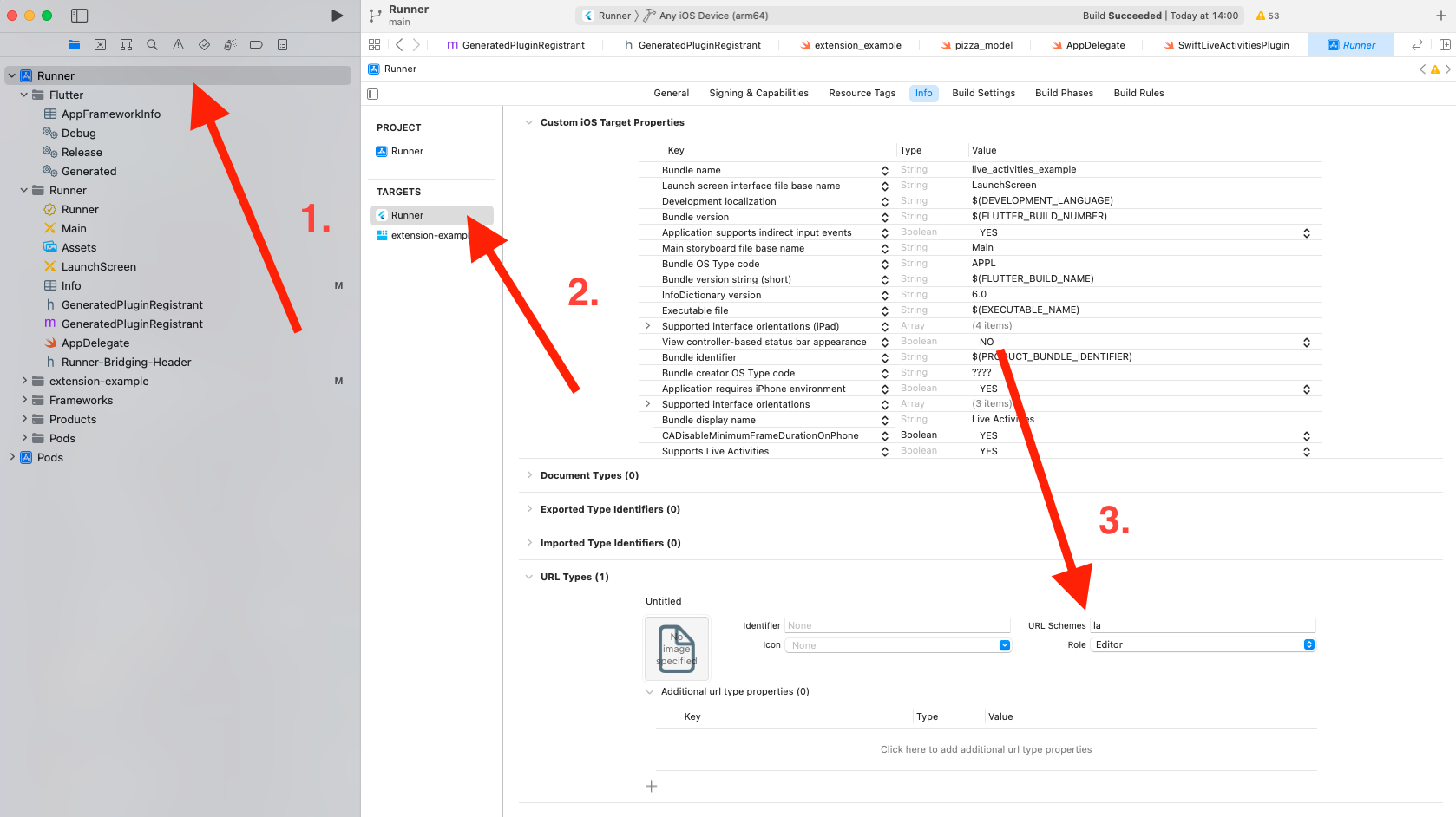
In order to pass some useful data between your native live activity / dynamic island with your Flutter app you just need to setup URL scheme.
⚠️ It's recommended to set a custom scheme, in this example,
lais used but keep in mind, you should use a more personalized scheme.
ex: for an app named
Strava, you could usestr.
- Add a custom url scheme in Xcode by navigating to Runner > Runner > * *URL Types** > **URL Schemes**
- In your Swift code, just create a new link and open to your custom URL Scheme
Link(destination: URL(string: "la://my.app/order?=123")!) { // Replace "la" with your scheme
                  Text("See order")
                }
⚠️ Don't forget to put the URL Scheme you have typed in the previous step. (
str://in the previous example)
- In your Flutter App, you need to init the custom scheme you provided before
_liveActivitiesPlugin.init(
                  appGroupId: 'your.group.id', // replace here with your custom app group id
                  urlScheme: 'str' // replace here with your custom app scheme
                );
- Finally, on the Flutter App too, you just need to listen on the url scheme Scheme
_liveActivitiesPlugin.urlSchemeStream().listen((schemeData) {
                  // do what do you want here 🤗
                });
Update Live Activity with push notification 🎯
You can update live activity directly in your app using the updateActivity()
method, but if your app was killed or in the background, you can’t update the
notification...
To do this, you can update it using Push Notification on a server.
- Get the push token:
- Listen on the activity updates (recommended):
_liveActivitiesPlugin.activityUpdateStream.listen((event) { event.map( active: (activity) { // Get the token print(activity.activityToken); }, ended: (activity) {}, unknown: (activity) {}, ); }); - Get directly the push token (not recommended, because the token may change
in the future):
final activityToken = await _liveActivitiesPlugin.getPushToken(_latestActivityId!);
                print(activityToken);
- Listen on the activity updates (recommended):
- Update your activity with the token on your server (more information can be * *found here **).
To set matchName for a specific notification, you just need to grab the
notification id you want (ex. 35253464632) and concatenate with your key by
adding a _, example: 35253464632_matchName.
That's it 😇
Push-to-Start Live Activities (iOS 17.2+) 🚀
iOS 17.2 introduces the ability to create Live Activities remotely via push notifications before the user has even opened your app. This is called "push-to-start" functionality.
However, we don't recommend to use this feature to manage Live Activities from your server because, you will need to have on your server the live activity ID and the user's pushToken.
We recommend to send a classic notification to yours users which invite them to open your app. Then you can launch the live activity and send to your server the necessary (activityID + PushToken).
- First, check if the device supports push-to-start:
final isPushToStartSupported = await _liveActivitiesPlugin.allowsPushStart();

                if (isPushToStartSupported) {
                  // Device supports push-to-start (iOS 17.2+)
                }
- To use push-to-start, you need to listen for push-to-start tokens:
_liveActivitiesPlugin.pushToStartTokenUpdateStream.listen((String token) {
                  // Send this token to your server
                  print('Received push-to-start token: $token');

                  // Your server can use this token to create a Live Activity
                  // without the user having to open your app first
                });
Server Implementation
On your server, you'll need to send a push notification with the following payload structure:
FCM example payload :
{
                  "token": "user_fcm_token",            // Replace with the user's FCM token
                  "data": {                             // All fields inside data must be strings
                    "timestamp": "1749113270446",       // Required, Must be in milliseconds since epoch
                    "event": eventType,                 // Required, can be "start", "update" or "end"
                    "content-state": JSON.stringify({   // Dynamic data to be passed to the Live Activity, must be stringified
                    "activity-id": "live_activity_id",  // Required, it must be a String, you should use a something like match.id
                    "teamAName": "Team A",
                    "teamBName": "Team B",
                    "teamAScore": 0,
                    "teamBScore": 0,
                    }),
                  },
                  "android": {
                    "priority": "high"
                  },
                  "apns": {
                    "live_activity_token": "user_push_token", // Replace with the user's Live Activity push token
                    "headers": {
                      "apns-priority": "10"
                    },
                    "payload": {
                      "aps": {
                        "timestamp": 1749113280,      // Required, Must be in seconds since epoch
                        "dismissal-date": 1749113280  // Only for "end" event, must be in seconds since epoch
                        "event": "start",             // Required, "start", "update", "end"
                        "content-state": {            // Dynamic data to be passed to the Live Activity
                          "teamAScore": 0,
                          "teamBScore": 0,
                        },
                        "attributes-type": "AdventureAttributes",
                        "attributes": {               // Static data to be passed to the Live Activity
                          "teamAName": "Team A",
                          "teamBName": "Team B",
                        },
                        "alert": {
                          "title": {
                            "loc-key": "%@ is on an adventure!",
                            "loc-args": [
                              "Power Panda"
                            ]
                          },
                          "body": {
                            "loc-key": "%@ found a sword!",
                            "loc-args": [
                              "Power Panda"
                            ]
                          },
                          "sound": "chime.aiff"        // or "" to disable sound
                        }
                      }
                    }
                  }
                }
The push notification should be sent to the push-to-start token you received from the pushToStartTokenUpdateStream. Your server needs to use Apple's APNs with the appropriate authentication to deliver these notifications.
📘 Documentation
| Name | Description | Returned value |
|---|---|---|
.init() |
Initialize the Plugin by providing an App Group Id (see above) | Future When the plugin is ready to create/update an activity |
.createActivity() |
Create an iOS live activity | String The activity identifier |
.createOrUpdateActivity() |
Create or updates an (existing) live activity based on the provided UUID via customId |
String The activity identifier |
.updateActivity() |
Update the live activity data by using the activityId provided |
Future When the activity was updated |
.endActivity() |
End the live activity by using the activityId provided |
Future When the activity was ended |
.getAllActivitiesIds() |
Get all activities ids created | Future<List<String>> List of all activities ids |
.getAllActivities() |
Get a Map of activitiyIds and the ActivityState |
Future<Map<String, LiveActivityState>> Map of all activitiyId -> LiveActivityState |
.endAllActivities() |
End all live activities of the app | Future When all activities was ended |
.areActivitiesEnabled() |
Check if live activities feature are supported & enabled | Future<bool> Live activities supported or not |
.allowsPushStart() |
Check if device supports push-to-start for Live Activities (iOS 17.2+) | Future<bool> Whether push-to-start is supported |
.getActivityState() |
Get the activity current state | Future<LiveActivityState?> An enum to know the status of the activity (active, dismissed or ended) |
.getPushToken() |
Get the activity push token synchronously (prefer using activityUpdateStream instead to keep push token up to date) |
String? The activity push token (can be null) |
.urlSchemeStream() |
Subscription to handle every url scheme (ex: when the app is opened from a live activity / dynamic island button, you can pass data) | Future<UrlSchemeData> Url scheme data which handle scheme url host path queryItems |
.dispose() |
Remove all pictures passed in the AppGroups directory in the current session, you can use the force parameters to remove all pictures |
Future Picture removed |
.activityUpdateStream |
Get notified with a stream about live activity push token & status | Stream<ActivityUpdate> Status updates for new push tokens or when the activity ends |
.pushToStartTokenUpdateStream |
Stream of push-to-start tokens for creating Live Activities remotely (iOS 17.2+) | Stream<String> Stream of tokens for push-to-start capability |
🤔 Questions
Do I have to code in Swift?
Yes you need to implement your activity in Swift but no worries, there is a lot of cool tutorials:
I have an issue when building my app on iOS:
Error (Xcode): Cycle inside Runner; building could produce unreliable results.
This error occurs due to a build script ordering issue. Follow this guide to resolve it.
I can't see my live activity when I create it...
It can be related to multiple issues, please be sure to:
- App Groups Capability: Set up the
App Groupscapability for BOTH the
`Runner` and your `extension` targets.
- Same App Group: Use the SAME app group for both the
Runnerand
`extension` targets.
- Push Notification Capability: Verify that the
Push Notificationcapability
is enabled for the `Runner` target.
- ActivityAttributes Definition: In your extension’s
`ExtensionNameLiveActivity.swift` file, ensure you create an
                ActivityAttributes named **EXACTLY** `LiveActivitiesAppAttributes`.
- Asset Size Limit: Images in live activities must be under or equal 4 KB.
Use the resize factor argument to reduce image size if necessary.
- Supports Live Activities: Be sure to set the
NSSupportsLiveActivities
property to `true` in `Info.plist` files for **BOTH** `Runner` and your
                `extension`.
- iOS Version Requirement: The device must run iOS 16.1 or later.
- Device Activity Check: Confirm that the
areActivitiesEnabled()method
returns true on your device.
- Minimum Deployment Target: Confirm that the
extensionsdeployment target
is not set lower than your devices.
Is Android supported?
Yes but it's less mature than iOS for the moment. Android support is in beta.
You can call
areActivitiesEnabled()before creating your activity to ensure it can be displayed on the user's device. 😊
👥 Contributions
Contributions are welcome. Contribute by creating a PR or an issue 🎉.
🎯 Roadmap
- Inject a Widget inside the notification with Flutter Engine?
- Android support.
- Migrate to Swift Package Manager.
- Support push token.
- Pass media between extension & Flutter app.
- Support multiple type instead of
String(Date, Number etc.). - Pass data across native dynamic island and Flutter app.
- Pass data across native live activity notification and Flutter app.
- Cancel all activities.
- Get all activities ids.
- Check if live activities are supported.
Changelog
2.4.2
- ✨ New method
areActivitiesSupported()➡️ Check if live activities are supported on the current platform/OS version. (thanks to @MortadhaFadhlaoui 👍). - 🏗️ Method
areActivitiesEnabled()➡️ Now only checks user settings without platform version validation. (thanks to @MortadhaFadhlaoui 👍).
2.4.1
- 🐛 Check for customId in endActivitiesWithId (thanks to @dkobia 👍).
- 🐛 Bugfix avoid remove all notifications (thanks to @EArminjon 👍).
2.4.0 - Live activity is now available for Android too!
- ✨ Add support for Android Live Activities (thanks to @EArminjon 👍).
- 🐛 Custom ID activities fail to end correctly (thanks to @charleyzhu 👍).
- 📝 Update README.md for local and remote Live activities.
ℹ️ BREAKING CHANGES ℹ️
- On both platforms, activityID is now a required parameter for
createActivityandcreateOrUpdateActivity(). - Bump iOS minimum version to 13.
2.3.2
- ✨ Ability to get the "pushToStartToken" (thanks to @Clon1998 👍).
- ⬆️ Upgrade dependencies.
2.3.1
- 🐛
LiveActivityFileFromMemorycan't share image with AppGroup (thanks to @EArminjon 👍). - 📝 Added minor version check when not being able to see the Live Activity (thanks to @dasanten 👍).
- ⬆️ Upgrade dependencies.
2.3.0
- 🏗️ Move to Swift Package Manager.
- 🏗️ Regenerate example app.
- ⬆️ Upgrade dependencies.
2.2.0
- ✨ Added a new method
createOrUpdateActivity(), you can use it to create or update by passing an activity ID (thanks to @Clon1998 👍). - ⬆️ Upgrade dependencies.
2.1.0
- ✨ You can now send generic files instead of just pictures.
To send a file you can do the following on the Dart code:
LiveActivityFileFromAsset('assets/files/rules.txt')
And in your Swift code:
let ruleFile = sharedDefault.string(forKey: context.attributes.prefixedKey("yourFileKey"))!
                let rule = (try? String(contentsOfFile: ruleFile, encoding: .utf8)) ?? ""
Check the example for a full demo.
BREAKING CHANGES
You must replace your images to:
LiveActivityFileFromAsset.image()LiveActivityFileFromMemory.image()LiveActivityFileFromUrl.image()
In order to use resizeFactor you must do the following now:
LiveActivityFileFromAsset.image(
                  'assets/images/chelsea.png',
                  imageOptions: LiveActivityImageFileOptions(
                    resizeFactor: 0.2
                  )
                ),
- 🐛 Example works again with scheme.
2.0.1
- 🐛 Fix channel message sent from native to Flutter on a non-platform thread (thanks to @aswanath 👍)
- 🗑️ Clean some code.
2.0.0
- ✨ Use new custom iOS App Group Directory dependency (this will fix namespace for Android gradle builds).
- ✨ Removed deprecated flutter_native_image dependency and replaced by image (thanks to @SnapDrive 👍)
- ⬆️ Upgrade dependencies.
1.9.5
- 🐛 Fix
areActivitiesEnabled()on unsupported devices.
1.9.4
- 🍱 Convert images to webp.
- ⬆️ Upgrade dependencies.
1.9.3
- 🐛 Force returning false for
areActivitiesEnabled()when no iOS devices.
1.9.2
- ✨ Simplified fetching of ActivityState of all created live activities (thanks to @Clon1998 👍).
- 🐛 Fixes background thread invocation of event streams (thanks to @ggirotto 👍).
- 🐛 Replaced getImageProperties with dart buffer and descriptor (thanks to @anumb 👍).
- 🐛 Fix tests.
- ⬆️ Upgrade dependencies.
1.9.1
- ✨ Add update with alert config (thanks @charlesRmajor 👍).
- ✨ Add an option to use preloaded images (thanks @Niklas-Sommer 👍).
- ✨ Add Android support - currently only used to check if live activities is supported (thanks @ggirotto 👍).
- ✨ Example app support Material 3.
- 🐛 Fix tests.
- 📝 Update README.md.
- ⬆️ Upgrade dependencies.
1.9.0
- ✨ BREAKING CHANGE: Add the ability to handle multiple live notification (thanks @Clon1998 👍).
Please follow this tutorial to add implement it:
- Add the following Swift extension at the end of your extension code:
extension LiveActivitiesAppAttributes {
                  func prefixedKey(_ key: String) -> String {
                    return "\(id)_\(key)"
                  }
                }
- For each keys on your native Swift code, please changes the following lines:
let myVariableFromFlutter = sharedDefault.string(forKey: "myVariableFromFlutter") // repleace this by ...
                let myVariableFromFlutter = sharedDefault.string(forKey: context.attributes.prefixedKey("myVariableFromFlutter")) // <-- this
- 🐛 Fix stall state for unknown activityId (thanks @Clon1998 👍).
- 🐛 Now return
nullvalue when activity is not found ingetActivityState().
1.8.0
- ✨ Add url scheme optional argument.
- ✨ Add sinks unregister on engine end (thanks @ggirotto 👍).
- 🐛 Fix example images size.
- ⬆️ Upgrade dependencies.
1.7.5
- 🚨 Lint some code.
- 🐛 Fix deprecated tests.
- ⬆️ Upgrade dependencies.
1.7.4
- 🐛 Method
areActivitiesEnabled()are now callable on iOS < 16.1 - ✨ Creating an activity can now use stale-date (thanks @arnar-steinthors 👍).
1.7.3
- ✨ ActivityUpdate subclasses are now public along with a new MapOrNull method (thanks @arnar-steinthors 👍).
1.7.2
- ✨ Add missing "stale" activity status.
- 🐛 When value set to null in map, value is removed from live activity.
1.7.1
- 🐛 Fix missing
activityUpdateStreamimplementation channel on native part.
1.7.0
- ✨🐛 Change method
getPushToken()to be synchronous. - ⬆️ Upgrade dependencies.
1.6.0
- ✨ Add a way to track push token and the activity status (thanks @arnar-steinthors 👍).
- ♻️ Format code.
1.5.0
- ✨ Add method to get push token (thanks to @jolamar 👍).
- ♻️ Rework Swift code.
1.4.2+1
- 📝 Add screenshots in pubspec.yaml
1.4.2
- ✨ End live activity when the app is terminated (thanks to @JulianBissekkou 👍).
1.4.1
- 🐛 Fix a bug where init never completes (thanks to @JulianBissekkou 👍).
1.4.0
- ✨ Can now pass assets between Flutter & Native.
- 📝 Update README.md.
1.3.0+1
- 📝 Update README.md.
1.3.0
- ✨ Now using App Groups to pass typed data across Flutter & Native !
- 🗑️ Remove unused code in example.
- 📝 Improve README.md.
1.2.1
- ✨ Add method to get the activity state (active, ended or dismissed).
1.2.0
- ✨ Add stream to handle url scheme from live activities &/or dynamic island.
- 📝 Improve README.md
- ♻️ Rework example
1.1.0
- ✨ Add method to check if live activities are enabled.
- ✨ Add method to get all activities ids created.
- ✨ Add method to cancel all activities.
- 🐛 Fix add result to all methods.
1.0.0
- 🎉 Initial release.