
talker
v4.9.3Advanced error handler and logger package for flutter and dart. App monitoring, logs history, report sharing, custom logs, and etc.
Package archive: https://pubdev.letsnova.ru/api/archives/talker/4.9.3.tar.gz
dart pub add talkerReadme

Advanced error handler and logger for dart and flutter apps
Log your app actions, catch and handle exceptions and errors, show alerts and share log reports
Show some ❤️ and star the repo to support the project!
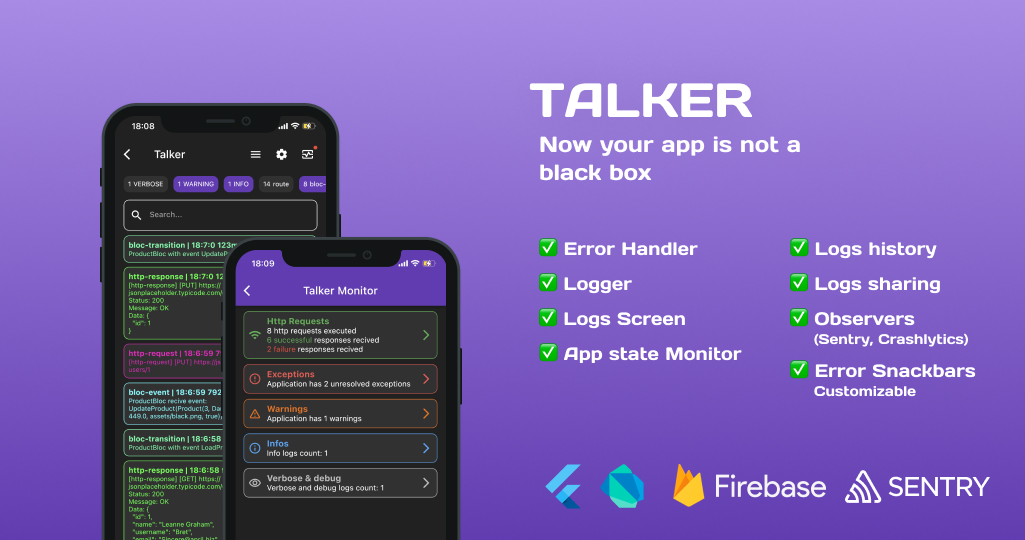







For better understanding how it works check Web Demo page

Motivation
🚀 The main goal of the project is provide ability to understand where the error occurs in a shortest possible time
✅ Compatible with any state managements
✅ Works with any crash reporting tool (Firebase Crashlytics, Sentry, custom tools, etc.)
✅ Logs UI output of Flutter app on the screen
✅ Allows sharing and saving logs history and error crash reports
✅ Displays alerts for UI exceptions.
✅ Built-in support for dio HTTP logs
✅ Built-in support for BLoC logs
✅ Built-in support for Riverpod logs
✅ Check all features
Packages
Talker is designed for any level of customization.
| Package | Version | Description |
|---|---|---|
| talker |  |
Main dart package for logging and error handling |
| talker_flutter |  |
Flutter extensions for talker Colored Flutter app logs (iOS and Android), logs list screen, showing error messages at UI out of the box, route observer, etc |
| talker_logger |  |
Customizable pretty logger for dart/flutter apps |
| talker_dio_logger |  |
Best logger for dio http calls |
| talker_bloc_logger |  |
Best logger for BLoC state management library |
| talker_riverpod_logger |  |
Best logger for Riverpod state management library |
| talker_http_logger |  |
Best logger for http package |
Table of contents
- Motivation
- Packages
- Talker
- Talker Flutter
- Integrations
- Talker Dio Logger
- Talker BLoC Logger
- Talker Riverpod Logger
- Crashlytics integration
- Features list
- Coverage
- Additional information
- Contributors
Talker
Get Started
Follow these steps to the coolest experience in error handling
Add dependency
dependencies:
                  talker: ^4.9.3
Easy to use
You can use Talker instance everywhere in your app
Simple and concise syntax will help you with this
  import 'package:talker/talker.dart';

                  final talker = Talker();

                  /// Just logs
                  talker.warning('The pizza is over 😥');
                  talker.debug('Thinking about order new one 🤔');

                  // Handling Exception's and Error's
                  try {
                    throw Exception('The restaurant is closed ❌');
                  } catch (e, st) {
                    talker.handle(e, st);
                  }

                  /// Just logs
                  talker.info('Ordering from other restaurant...');
                  talker.info('Payment started...');
                  talker.good('Payment completed. Waiting for pizza 🍕');
More examples you can get there

⚙️ Customization
Configure the error handler and logger for yourself
final talker = Talker(
                    settings: const TalkerSettings(
                      /// You can enable/disable all talker processes with this field
                      enabled: true,
                      /// You can enable/disable saving logs data in history
                      useHistory: true,
                      /// Length of history that saving logs data
                      maxHistoryItems: 100,
                      /// You can enable/disable console logs
                      useConsoleLogs: true,
                    ),
                    /// Setup your implementation of logger
                    logger: TalkerLogger(),
                    ///etc...
                  );
More examples you can get here
Custom logs
With Talker you can create your custom log message types.
And you have full customization control over them!
class YourCustomLog extends TalkerLog {
                    YourCustomLog(String super.message);

                    /// Log title
                    static get getTitle => 'Custom';

                    /// Log key
                    static get getKey => 'custom_log_key';

                    /// Log color
                    static get getPen => AnsiPen()..yellow();

                    /// The following overrides are required because the base class expects instance getters,
                    /// but we use static getters to allow for easy customization and reuse of colors, titles, and keys.
                    /// This approach works around limitations in the base class API, which does not support passing custom values
                    /// directly to the constructor or as parameters, so we override the instance getters to return the static values.
                    @override
                    String get title => getTitle;

                    @override
                    String get key => getKey;

                    @override
                    AnsiPen get pen => getPen;
                 }

                final talker = Talker();
                talker.logCustom(YourCustomLog('Something like your own service message'));

Change log colors
Starting from version 4.0.0, you have the ability to fully customize all logs colors. You can set your own color for any type of logs. For example, you can choose red for HTTP responses and green for errors—whatever suits your preference 😁
The map is now structured as {String: AnsiPen}.
String Key
The String key serves as an identifier for a specific log type (e.g., HTTP, error, info, etc.).
- Default log types are accessible via the
keyfield in theTalkerLogTypeenum. - Developers can also define custom log pen by providing their own string keys, like
'custom_log_key'.
final talker = Talker(
                  settings: TalkerSettings(
                    colors: {
                      // Colors for default log types can be defined with AnsiPen
                      TalkerLogType.httpResponse.key: AnsiPen()..red(),
                      TalkerLogType.error.key: AnsiPen()..green(),
                      TalkerLogType.info.key: AnsiPen()..blue(),

                      // Custom Logs can be defined

                      // ... from the custom log's key name
                      'custom_log_key': AnsiPen()..yellow(),

                      // ... or from the variable
                      YourCustomLog.getKey: AnsiPen()..yellow(),

                      // ... or using the variable and the previously defined custom color for conformity
                      YourCustomLog.getKey: YourCustomLog.getPen
                    },
                  ),
                );

Talker have default color scheme. You can check it in TalkerSettings class
Change log titles
Starting from version 4.0.0, you have the ability to fully customize all logs titles. You can set your own title for any type of logs.
The map is now structured as {String: AnsiPen}.
String Key
The String key serves as an identifier for a specific log type (e.g., HTTP, error, info, etc.).
- Default log types are accessible via the
getKeyfield in theTalkerLogTypeenum. - Developers can also define custom log title by providing their own string keys, like
'custom_log_key'.
final talker = Talker(
                  settings: TalkerSettings(
                    titles: {
                      // Titles for default log types can be defined with strings
                      TalkerLogType.exception.key: 'Whatever you want',
                      TalkerLogType.error.key: 'E',
                      TalkerLogType.info.key: 'i',

                      // Custom Logs can be defined

                      // ... from the custom log's key name
                      'custom_log_key': "new custom title!",

                      // ... or from the variable
                      YourCustomLog.getKey: "new custom title!",

                      // ... or using the variable and the previously defined custom title for conformity
                      YourCustomLog.getKey: YourCustomLog.getTitle
                    },
                  ),
                );

Talker have default titles scheme. You can check it in TalkerSettings class
TalkerObserver
TalkerObserver is a mechanism that allows observing what is happening inside Talker from the outside.
import 'package:talker/talker.dart';

                class ExampleTalkerObserver extends TalkerObserver {
                  ExampleTalkerObserver();

                  @override
                  void onError(TalkerError err) {
                    /// Send data to your error tracking system like Sentry or backend
                    super.onError(err);
                  }

                  @override
                  void onException(TalkerException exception) {
                    /// Send Exception to your error tracking system like Sentry or backend
                    super.onException(exception);
                  }

                  @override
                  void onLog(TalkerDataInterface log) {
                    /// Send log message to Grafana or backend
                    super.onLog(log);
                  }
                }

                final observer = ExampleTalkerObserver();
                final talker = Talker(observer: observer);
You can use it to transmit data about logs to external sources such as Crashlytics, Sentry, Grafana, or your own analytics service, etc.
Talker Flutter
Get Started Flutter
Talker Flutter is an extension for the Dart Talker package that adds extra functionality to make it easier for you to handle logs, errors, and exceptions in your Flutter applications.
Add dependency
dependencies:
                  talker_flutter: ^4.9.3
Setup
import 'package:talker_flutter/talker_flutter.dart';

                final talker = TalkerFlutter.init();

                // Handle exceptions and errors
                try {
                  // your code...
                } catch (e, st) {
                    talker.handle(e, st, 'Exception with');
                }

                // Log your app info
                talker.info('App is started');
                talker.critical('❌ Houston, we have a problem!');
                talker.error('🚨 The service is not available');
❗️ Log messages integrity
Most of flutter logging packages either cut messages in the console, or cant dope colored messages in the iOS console. But Talker is not one of them...
Talker uses the optimal method for logging depending on the Operating system on which it runs
But to do this, you need to use the initialization given in the example. Only with TalkerFlutter.init()
As result of this method you will get the same instance of Talker as when creating it through the Talker() constructor but with logging default initialization
TalkerScreen
Often you need to check what happening in the application when there is no console at hand.
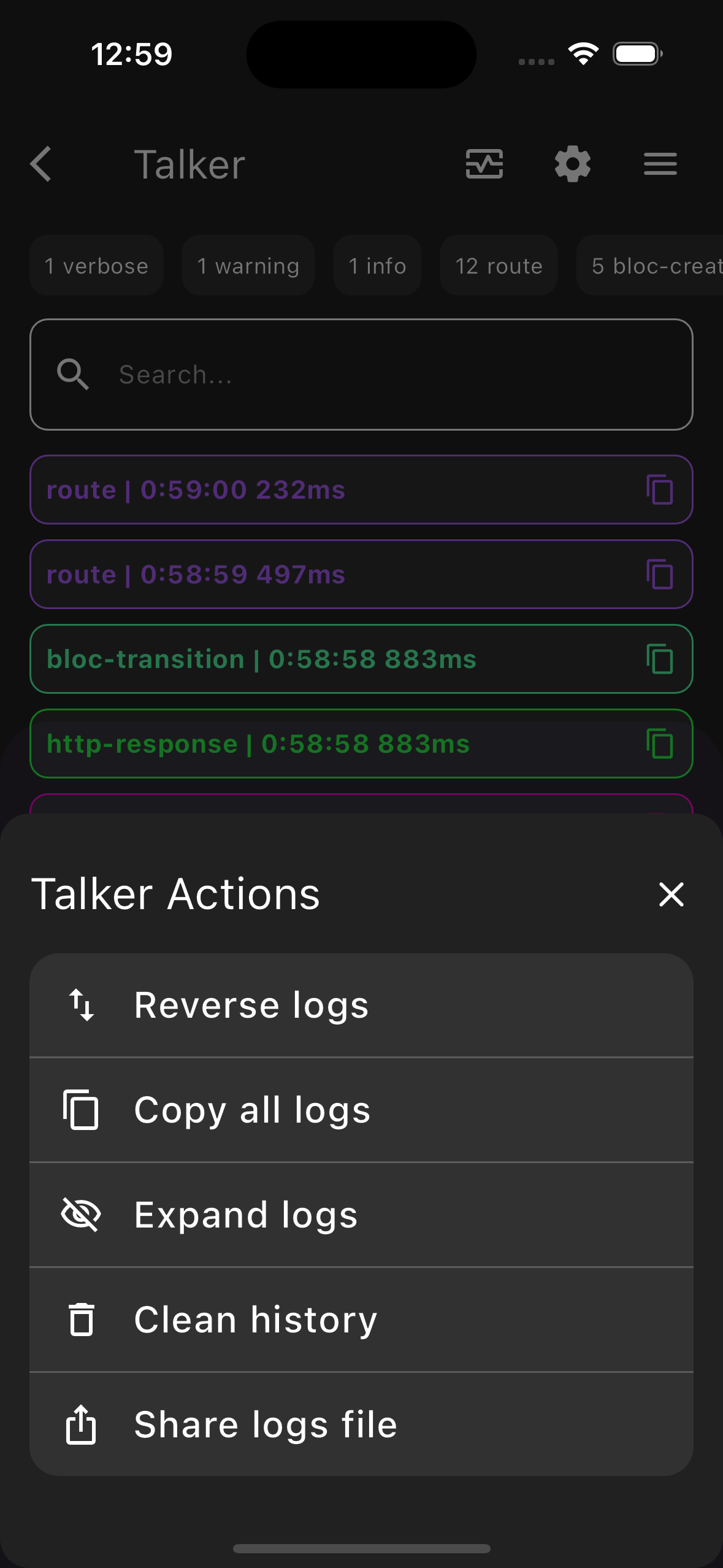
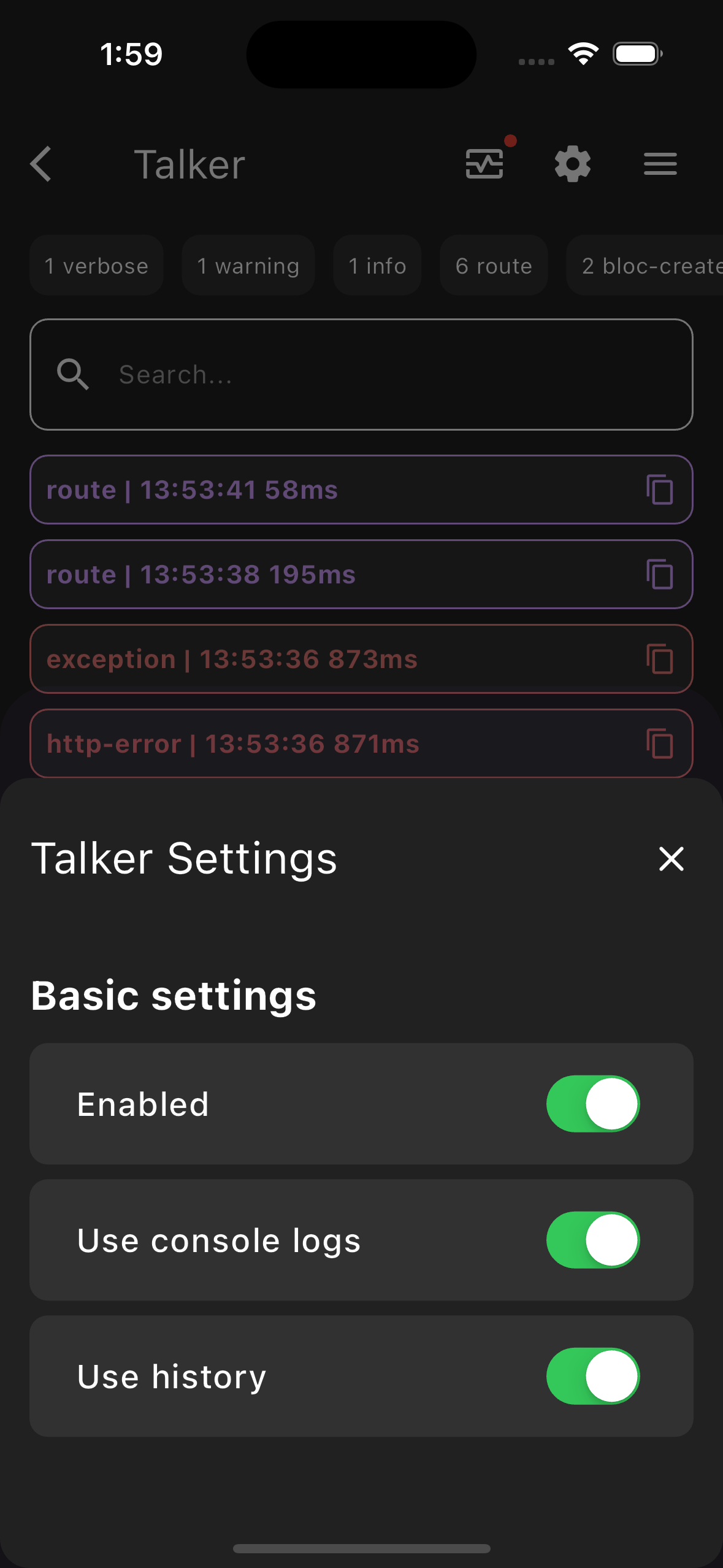
There is a TalkerScreen widget from talker_flutter package for this situations.
For better understanding how it works check Web Demo page
|
|
|
|
|---|---|---|---|
| TalkerScreen | TalkerFilter | TalkerActions | TalkerSettings |


Easy to use
You can use TalkerScreen everywhere in your app
At Screen, BottomSheet, ModalDialog, etc...
import 'package:talker_flutter/talker_flutter.dart';

                final talker = TalkerFlutter.init();

                Navigator.of(context).push(
                  MaterialPageRoute(
                    builder: (context) => TalkerScreen(talker: talker),
                  )
                );
See more in TalkerScreen usage example
Customization
Starting from version 4.0.0, you have the ability to fully customize your TalkerScreen display. You can set your own color for any type of logs. For example, you can choose red for HTTP responses and green for errors—whatever suits your preference 😁
|
|
|
|
|---|


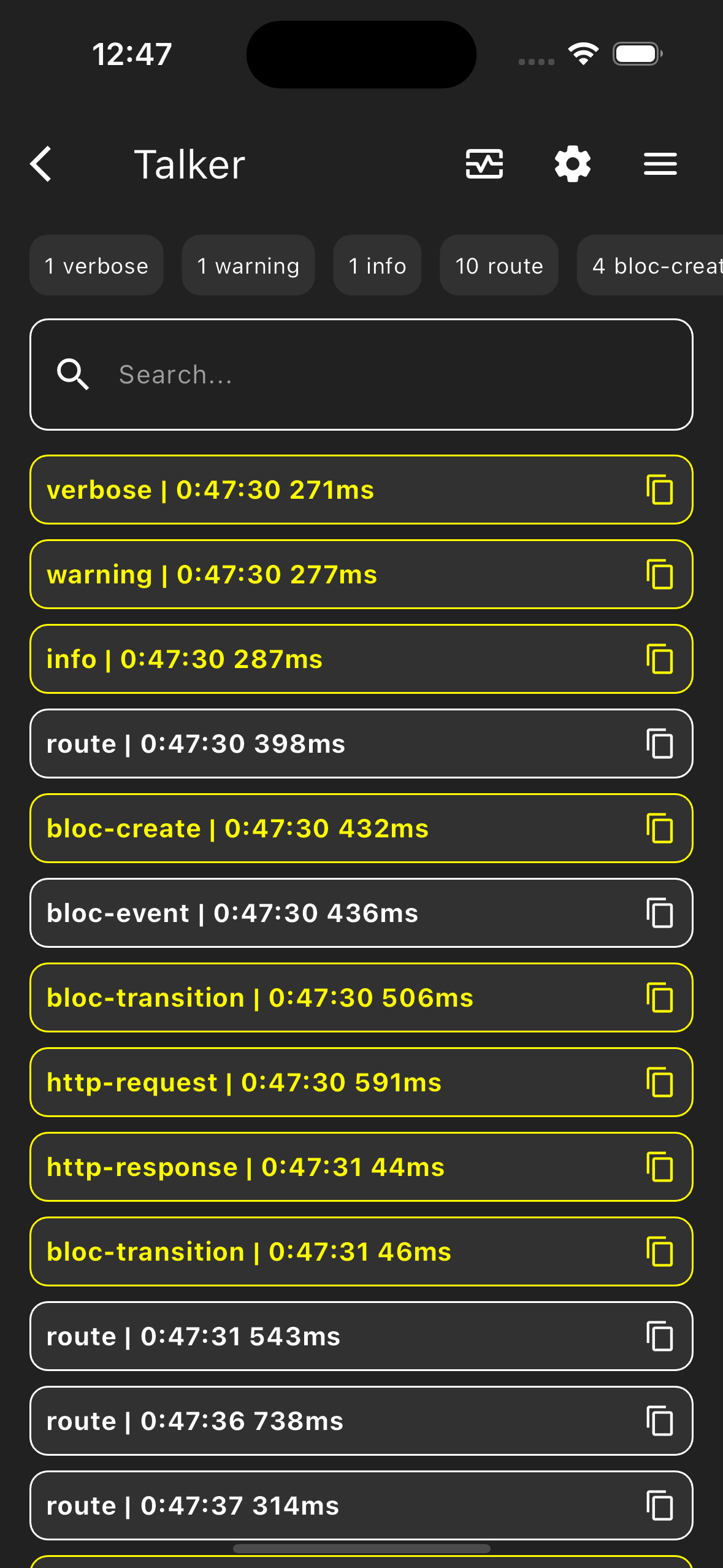
How to set custom colors ?
To set your custom colors, you need to pass a TalkerScreenTheme object to the TalkerScreen constructor, with a Map containing the desired colors.
The Map is structured as {log type: color}. TalkerLogType is an identifier for a specific log type (e.g., HTTP, error, info, etc.), and each log type in Talker has its own field in the enum.
import 'package:talker_flutter/talker_flutter.dart';

                final talker = TalkerFlutter.init();

                TalkerScreen(
                  talker: talker,
                  theme: const TalkerScreenTheme(
                    logColors: {

                      // Default log type colors can be overridden from the color object
                      TalkerLogType.httpResponse.key: Color(0xFF26FF3C),
                      // ... or from flutter material colors
                      TalkerLogType.error.key: Colors.redAccent,
                      // ... or from ARGB values
                      TalkerLogType.info.key: Color.fromARGB(255, 0, 255, 247),

                      // Custom logs can override their terminal colors

                      // ... using the key string
                      'custom_log_key': Colors.green,

                      // ... or from the variable
                      YourCustomLog.getKey: Colors.green,

                      // ... but they cannot use the previously defined color from the custom log object,
                      // ... because flutter doesn't display ansi colors in widgets.
                      // ... However, you can use material colors, the color object, or ARGB values for them
                      YourCustomLog.getKey: Color(0xFF26FF3C)
                    },
                  )
                )
TalkerScreenTheme
You can set custom backagroud, card and text colors for TalkerScreen with TalkerScreenTheme
TalkerScreenTheme(
                  cardColor: Colors.grey[700]!,
                  backgroundColor: Colors.grey[800]!,
                  textColor: Colors.white,
                  logColors: {
                    /// Your logs colors...
                  },
                )
TalkerRouteObserver
Observer for a navigator.
If you want to keep a record of page transitions in your application, you've found what you're looking for.
You can use TalkerRouteObserver with any routing package
From auto_route to basic Flutter Navigator
Navigator
final talker = Talker();

                MaterialApp(
                  navigatorObservers: [
                    TalkerRouteObserver(talker),
                  ],
                )
auto_route
final talker = Talker();

                MaterialApp.router(
                  routerDelegate: AutoRouterDelegate(
                    appRouter,
                    navigatorObservers: () => [
                      TalkerRouteObserver(talker),
                    ],
                  ),
                ),
auto_route v7
final talker = Talker();

                MaterialApp.router(
                  routerConfig: _appRouter.config(
                    navigatorObservers: () => [
                      TalkerRouteObserver(talker),
                    ],
                  ),
                ),
go_router
final talker = Talker();

                GoRouter(
                  observers: [TalkerRouteObserver(talker)],
                )
TalkerMonitor
If you want to check the status of your application in a short time
TalkerMonitor will be the best solution for you
Monitor is a filtered quick information about http requests, exceptions, errors, warnings, etc... count
You will find Monitor at the TalkerScreen page
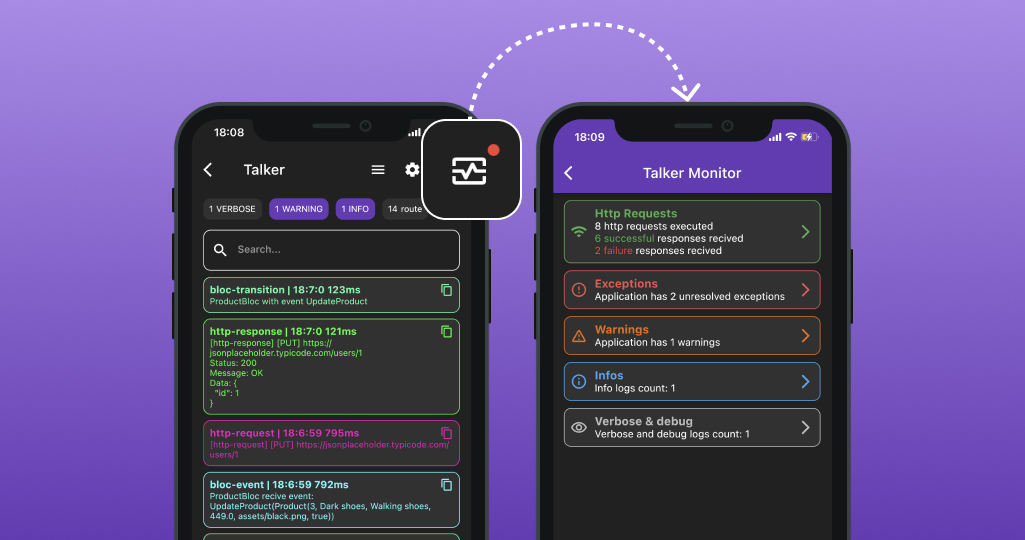
For better understanding how it works check Web Demo page
TalkerWrapper
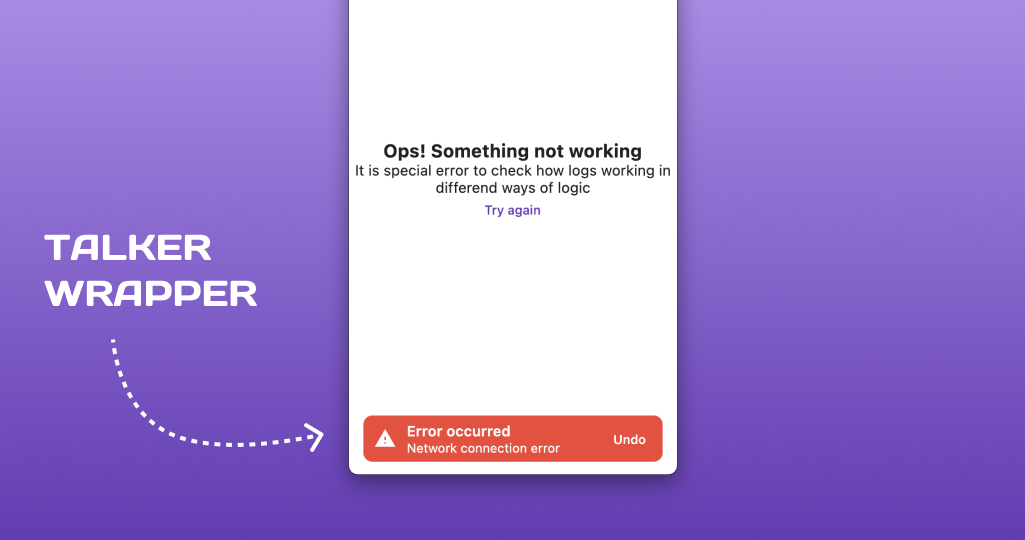
In addition talker_flutter is able to show default and custom error messages and another status messages via TalkerWrapper
import 'package:talker_flutter/talker_flutter.dart';

                final talker = TalkerFlutter.init();

                TalkerWrapper(
                  talker: talker,
                  options: const TalkerWrapperOptions(
                    enableErrorAlerts: true,
                  ),
                  child: /// Application or the screen where you need to show messages
                ),
More Features And Examples
Custom UI error messages
In order to understand in more details - you can check this article "Showing Flutter custom error messages"
TalkerWrapper usage example
ShopApp example
See full application example with BLoC and navigation here
The talker_flutter package have a lot of another widgets like TalkerBuilder, TalkerListener, etc. You can find all of them in code documentation.
Integrations
In addition to the basic functionality, talker was conceived as a tool for creating lightweight loggers for the main activities of your application
You can use ready out of the box packages like talker_dio_logger, talker_bloc_logger and talker_riverpod_logger or create your own packages.
Talker Dio Logger
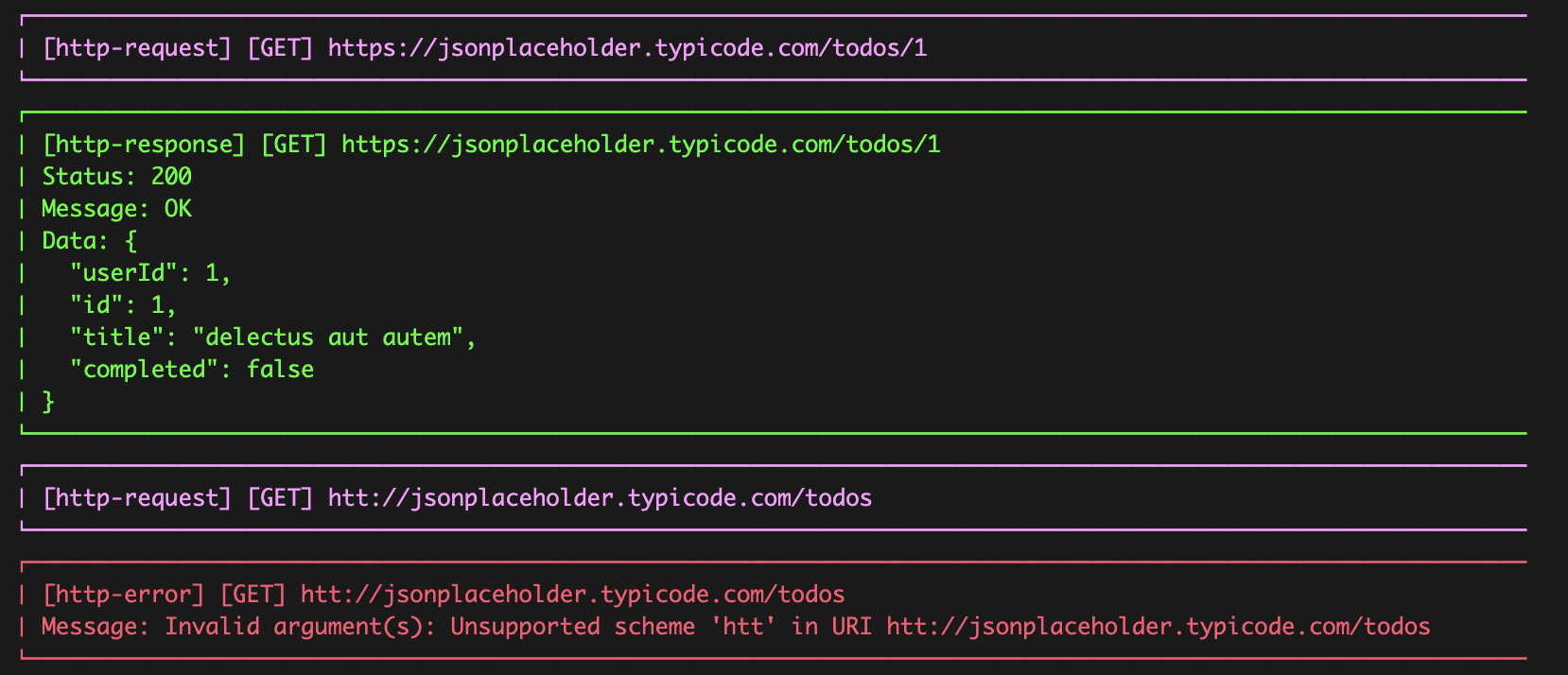
Lightweight, simple and pretty solution for logging if your app use dio as http-client
This is how the logs of your http requests will look in the console
Getting started
Follow these steps to use this package
Add dependency
dependencies:
                  talker_dio_logger: ^4.9.3
Usage
Just add TalkerDioLogger to your dio instance and it will work
final dio = Dio();
                dio.interceptors.add(
                    TalkerDioLogger(
                        settings: const TalkerDioLoggerSettings(
                          printRequestHeaders: true,
                          printResponseHeaders: true,
                          printResponseMessage: true,
                        ),
                    ),
                );
Customization
To provide hight usage exp here are a lot of settings and customization fields in TalkerDioLoggerSettings. You can setup all wat you want. For example:
Off/on http request or reposnse logs
You can toggle reponse / request printing and headers including
final dio = Dio();
                dio.interceptors.add(
                    TalkerDioLogger(
                        settings: const TalkerDioLoggerSettings(
                          // All http responses enabled for console logging
                          printResponseData: true,
                          // All http requests disabled for console logging
                          printRequestData: false,
                          // Reposnse logs including http - headers
                          printResponseHeaders: true,
                          // Request logs without http - headersa
                          printRequestHeaders: false,
                        ),
                    ),
                );
Change http logs colors
Setup your custom http-log colors. You can set color for requests, responses and errors in TalkerDioLoggerSettings
TalkerDioLoggerSettings(
                  // Blue http requests logs in console
                  requestPen: AnsiPen()..blue(),
                  // Green http responses logs in console
                  responsePen: AnsiPen()..green(),
                  // Error http logs in console
                  errorPen: AnsiPen()..red(),
                );
Filter http logs
For example if your app has a private functionality and you don't need to store this functionality logs in talker - you can use filters
TalkerDioLoggerSettings(
                  // All http request without "/secure" in path will be printed in console
                  requestFilter: (RequestOptions options) => !options.path.contains('/secure'),
                  // All http responses with status codes different than 301 will be printed in console
                  responseFilter: (response) => response.statusCode != 301,
                )
Using with Talker
You can add your talker instance for TalkerDioLogger if your app already uses Talker. In this case, all logs and errors will fall into your unified tracking system
final talker = Talker();
                final dio = Dio();
                dio.interceptors.add(TalkerDioLogger(talker: talker));
Talker BLoC Logger
Lightweight, simple and pretty solution for logging if your app use BLoC as state management
This is how the logs of your BLoC's event calling and state emits will look in the console

Getting started
Follow these steps to use this package
Add dependency
dependencies:
                  talker_bloc_logger: ^4.9.3
Usage
Just set TalkerBlocObserver as Bloc.observer field and it will work
import 'package:talker_bloc_observer/talker_bloc_observer.dart';

                Bloc.observer = TalkerBlocObserver();
Customization
To provide hight usage exp here are a lot of settings and customization fields in TalkerBlocLoggerSettings. You can setup all wat you want. For example:
Off/on events, transitions, changes, creation, close
You can toggle all bloc event types printing
Bloc.observer = TalkerBlocObserver(
                    settings: TalkerBlocLoggerSettings(
                      enabled: true,
                      printChanges: true,
                      printClosings: true,
                      printCreations: true,
                      printEvents: true,
                      printTransitions: true,
                    ),
                  );
Full/truncated state and event data
You can choose to have the logs of events and states in the BLoC displayed in the console in either full or truncated form
Bloc.observer = TalkerBlocObserver(
                    settings: TalkerBlocLoggerSettings(
                      printEventFullData: false,
                      printStateFullData: false,
                    ),
                  );
Filter bloc logs
You can output logs to the console for specific events and states only, using a filter
Bloc.observer = TalkerBlocObserver(
                    settings: TalkerBlocLoggerSettings(
                      // If you want log only AuthBloc transitions
                      transitionFilter: (bloc, transition) =>
                          bloc.runtimeType.toString() == 'AuthBloc',
                      // If you want log only AuthBloc events
                      eventFilter: (bloc, event) => bloc.runtimeType.toString() == 'AuthBloc',
                    ),
                  );
Using with Talker!
You can add your talker instance for TalkerBlocLogger if your Appication already uses Talker.
In this case, all logs and errors will fall into your unified tracking system
import 'package:talker_bloc_observer/talker_bloc_observer.dart';
                import 'package:talker/talker.dart';

                final talker = Talker();
                Bloc.observer = TalkerBlocObserver(talker: talker);
Talker Riverpod Logger
Lightweight, simple and pretty solution for logging if your app use Riverpod as state management
This is how the logs of your Riverpod's event calling and state emits will look in the console

Getting started
Follow these steps to use this package
Add dependency
dependencies:
                  talker_riverpod_logger: ^4.9.3
Usage
Just pass TalkerRiverpodObserver to either ProviderScope or ProviderContainer and it will work
import 'package:talker_riverpod_observer/talker_riverpod_observer.dart';

                runApp(
                  ProviderScope(
                    observers: [
                      TalkerRiverpodObserver(),
                    ],
                    child: MyApp(),
                  )
                );
or
import 'package:talker_riverpod_observer/talker_riverpod_observer.dart';

                final container = ProviderContainer(
                  observers: [
                    TalkerRiverpodObserver(),
                  ],
                );
Customization
To provide hight usage exp here are a lot of settings and customization fields in TalkerRiverpodLoggerSettings. You can setup all wat you want. For example:
Off/on events, add, update, dispose, fail
You can toggle all riverpod event types printing
TalkerRiverpodObserver(
                  settings: TalkerRiverpodLoggerSettings(
                    enabled: true,
                    printProviderAdded: true,
                    printProviderUpdated: true,
                    printProviderDisposed: true,
                    printProviderFailed: true,
                  ),
                )
Full/truncated state data
You can choose to have the logs of states in the Riverpod displayed in the console in either full or truncated form
TalkerRiverpodObserver(
                  settings: TalkerRiverpodLoggerSettings(
                    printStateFullData: false,
                  ),
                )
Filter Riverpod logs
You can output logs to the console for specific events only, using a filter
TalkerRiverpodObserver(
                  settings: TalkerRiverpodLoggerSettings(
                    // If you want log only AuthProvider events
                      eventFilter: (provider) => provider.runtimeType == 'AuthProvider<User>',
                  ),
                )
Using with Talker!
You can add your talker instance for TalkerRiverpodLogger if your Appication already uses Talker.
In this case, all logs and errors will fall into your unified tracking system
import 'package:talker_riverpod_observer/talker_riverpod_observer.dart';
                import 'package:talker/talker.dart';

                final talker = Talker();

                runApp(
                  ProviderScope(
                    observers: [
                      TalkerRiverpodObserver(
                        talker: talker,
                      ),
                    ],
                    child: MyApp(),
                  )
                );
or
import 'package:talker_riverpod_observer/talker_riverpod_observer.dart';
                import 'package:talker/talker.dart';

                final talker = Talker();

                final container = ProviderContainer(
                  observers: [
                    TalkerRiverpodObserver(
                      talker: talker,
                    ),
                  ],
                );
Crashlytics integration
If you add CrashlyticsTalkerObserver to your application, you will receive notifications about all application errors in the Crashlytics dashboard.
Additionally, you can configure it to send only specific errors to Crashlytics from within TalkerObserver.
import 'package:firebase_crashlytics/firebase_crashlytics.dart';
                import 'package:talker/talker.dart';

                class CrashlyticsTalkerObserver extends TalkerObserver {
                  CrashlyticsTalkerObserver();

                  @override
                  void onError(err) {
                      FirebaseCrashlytics.instance.recordError(
                        err.error,
                        err.stackTrace,
                        reason: err.message,
                      );
                  }

                  @override
                  void onException(err) {
                      FirebaseCrashlytics.instance.recordError(
                        err.exception,
                        err.stackTrace,
                        reason: err.message,
                      );
                  }
                }

                final crashlyticsTalkerObserver = CrashlyticsTalkerObserver();
                final talker = Talker(observer: crashlyticsTalkerObserver);
Features list
✅ Logging
-
✅ Filtering
-
✅ Formatting
-
✅ Color logs
-
✅ LogLevels (info, verbose, warning, debug, error, critical, fine, good)
-
✅ Customization for filtering, formatting and colors
-
🚧 Separation from system's and another flutter logs
-
🚧 Collapsible feature for huge logs
-
🚧 Logs grouping
✅ Errors handling
- ✅ Errors and Exceptions identification
- ✅ StackTrace
- 🚧 Error level identification
✅ Flutter
-
✅ Application logs sharing
-
✅ HTTP cals logging
-
✅ TalkerScreen - Showing logs list in Flutter app UI
-
✅ TalkerMonitor - A short summary of your application status. How much errors, how much warnings in Flutter app UI
-
✅ TalkerRouteObserver - router logging (which screen is opened, which is closed)
-
✅ TalkerWrapper - Showing errors and exceptions messages at UI
-
✅ TalkerListener - Listen logs data at application UI
-
✅ TalkerBuilder - UI builder to Logs List showing custom UI
-
✅ Android/Windows/Web application logs colors
-
✅ iOS/MacOS application logs colors
-
✅ Talker configuration chnages from TalkerFlutter
✅ Logs and errors history saving
✅ TalkerObserver - handle all logs, errors, exceptions for integrations (Sentry, Crashlytics)
Coverage
Error handling is a very important task
You need to choose carefully if you want to use a package for exceptions handling solution
Therefore, the project is 100% covered by tests

Additional information
The project is under development and ready for your pull-requests and issues 👍
Thank you for support ❤️
Contributors
Thanks to all contributors of this package
For help getting started with 😍 Flutter, view online documentation, which offers tutorials, samples, guidance on mobile development, and a full API reference.
Changelog
4.9.3
- [talker] chore(deps): update dependency gradle to v8.14.3 [talker] chore(deps): update plugin com.android.application to v8.11.1
Thanks to renovate
4.9.2
- [talker_dio_logger] Add response data converter
responseDataConverterfield forTalkerDioLoggerSettings
Thanks to zhengbomo
4.9.1
- [talker_http_logger] chore(deps): update plugin org.jetbrains.kotlin.android to v2
- [talker_http_logger] chore(deps): update plugin com.android.application to v8.10.1
Thanks to renovate
4.9.0
- [talker_flutter] chore: update share_plus to v11.0.0
Thanks to jeroenbell
4.8.4
- [talker_riverpod_logger] add family arguments to the logs
Thanks to lucavenir
4.8.3
- [talker_riverpod_logger] add an error filter
Thanks to lucavenir
4.8.2
- [talker] Add
CustomLogDocumentation - [example] Update plugin com.android.application to v8.10.1
- [example] Update dependency gradle to v8.14.1
Thanks to MeyerOppelt
4.8.1
- [talker_dio_logger] Add logging of request`s extra
Thanks to lucavenir
4.8.0
- [talker_flutter] Add custom settings section
Thanks to zvikarp
4.7.9
- [talker_bloc_logger] show full data of Bloc logs in Flutter Talker
Thanks to Mooyeee
4.7.8
- [talker_flutter] fix: respect custom TalkerLogger output in TalkerFlutter.init
Thanks to techouse
4.7.7
- [talker_logger] chore: update logger output type for improved clarity
Thanks to techouse
4.7.6
- [talker_flutter] fix: propagate
itemsBuildertoTalkerView
Thanks to AhmedEzio47
4.7.5
- Update example application dependencies
Thanks to apps/renovate
4.7.4
- [talker_dio_logger] Add logLevel field to provide in all dIo logs
Thanks to mylukin
4.7.3
- [talker_flutter] Fixed missing info and detailed message for exceptions
Thanks to salarshad
4.7.2
- [talker_dio_logger] Add response time to logs
- Add
printResponseTimefield forTalkerDioLoggerSettingsto turn on/off response time printing
Thanks to troyanskiy
4.7.1
- [talker_flutter] Fix scroll issue and widget usability with high text scale
Thanks to federicoviceconti
4.7.0
- [talker_flutter] Remove deprecated dart:html
- [talker_logger] Remove deprecated dart:html
Thanks to Mooyeee
4.6.14
- [talker] Fix search filtering rules
Nowtitles && types && searchQueryreplacetitles || types || searchQuerylogic
Thanks to N1X41
4.6.13
- [talker_dio_logger] Fix
hiddenHeadersalters the request headers
Thanks to amrgetment
4.6.12
- [talker_flutter] Rename conflict extension
firstWhereOrNullfromcollection
Thanks to Bogdan778
4.6.11
- [talker_dio_logger] Add
printResponseRedirectsfield intoTalkerDioLoggerSettingsto print Response redirects
Thanks to federicoviceconti
4.6.10
- [talker_flutter] Fix search textfield background color become white in light theme
Thanks to asadman1523
4.6.9
- [talker] Fix CustomLogs
penfield ignoring by console issue#313
4.6.8
- [talker_dio_logger] Fix substitution of hidden headers
hiddenHeadersfield inTalkerDioLoggerSettings
4.6.7
- [talker_http_logger] Add settings
TalkerLoggerSettingsfield to setup http logger settings - [talker_http_logger] Add
hiddenHeadersfield inTalkerLoggerSettingsto hide specific and sensitive http logger headers
Thanks to Ilushnik
4.6.6
- [talker_dio_logger] Add
hiddenHeadersfield inTalkerDioLoggerSettingsto hide specific and sensitive dio logger headers
Thanks to Ilushnik
4.6.5
- [talker_bloc_logger] Bump bloc version to 9.0.0
4.6.4
- [talker_flutter] Proper migration of support to the web using both html and wasm
- [talker_flutter] Update example dart sdk version to '>=3.6.0 <4.0.0'
Thanks to yelmuratoff
4.6.3
- [talker_flutter] Correction the import file name in the talker_flutter log downloader web
Thanks to samanzamani
4.6.2
- [talker_flutter] Migrate downloadLogs export to new js_interop package
4.6.1
- [talker_flutter] Add new web api support for download logs file
4.6.0
- [talker_flutter] Add support WASM for Flutter Web
- [talker_flutter] Support flutter 3.27, remove deprecations
Thanks to abdelaziz-mahdy
4.5.6
- [talker_flutter] Add copy functionality for filtered logs
Thanks to abdelaziz-mahdy
4.5.5
- [talker] Add history logging filter by LogLevel
- [talker_flutter] Fix TalkerScreen does not respect configured LogLevel setting
Thanks to mylukin
4.5.4
- [talker_flutter] Add isLogsExpanded and isLogOrderReversed flags to TalkerScreen widget
Thanks to Ilushnik
4.5.3
- [talker_http_logger] Add HttpErrorLog for wrong http statuses
Thanks to yelmuratoff
4.5.2
- [talker_flutter] Add fallback Flutter screen log card color by LogLevel
4.5.1
- [talker_flutter] Fix mapping LogColors to Flutter Color (Logs screen)
4.5.0
More Flexible Interaction with Custom Logs
- BREAKING [talker] Change the type of
colorsparameter in theTalkerSettingsclass fromMap<TalkerLogType, AnsiPen>?toMap<String, AnsiPen>?. Custom colors must now use a string key for log types. - BREAKING [talker] Change the type of
titlesparameter in theTalkerSettingsclass fromMap<TalkerLogType, String>?toMap<String, String>?. Custom titles must now use a string key for log types. - BREAKING [talker_flutter] Change the type of
colorsparameter in the TalkerScreenTheme class fromMap<TalkerLogType, Colors>?toMap<String, Colors>?. Custom colors must now use a string key for log types. - [talker] Add new tests and updated existing ones.
- [talker] Update the documentation for log customization.
Thanks to yelmuratoff
4.4.7
- [talker_dio_logger] Make encoder constant private
4.4.6
- [talker] Reanme logTyped method to logCustom
- [talker] Add Deprecated annotation for logTyped method
4.4.5
- [talker_logger] Add enable option field to control log output (on talker_logger level)
Thanks to weitsai
4.4.4
- [talker_dio_logger] Add enable option field to control log output (on talker_dio_logger level)
Thanks to weitsai
4.4.3
- [talker_http_logger] Bump http_interceptor package version to 2.0.0
4.4.2
- [talker] Fix provide pen color field in log() method
- [talker] Android dependecies actualization and bug fixing in example app code
Thanks to HE-LU and venkat9507
4.4.1
- [talker_flutter] Bump share_plus version to 10.0.1
- [talker_flutter] Bump path_provider version to 2.1.4
4.4.0
- [talker] Stable
TimeFormatrelease (Support of custom time formatting for every talker package) - [talker_riverpod_logger] Bump version to talker common versions system
4.3.5
- [talker_bloc_logger] Setup common time format from talker settings for Bloc logs
4.3.4
- [talker_riverpod_logger] Duplicated state logs fixes
Thanks to ArinFaraj
4.3.3
- [talker_bloc_logger] Fix bloc logs TimeFormat
Thanks to Mooyeee
4.3.2
- [talker_riverpod_logger] Fix issue with display time inside riverpod package
Thanks to yelmuratoff
4.3.1
- [talker_flutter] Fix showing times on FlutterScreen cards
Thanks to fieldOfView
4.3.0
- [talker_flutter] Custom logs timestamp formattings
Thanks to abdelaziz-mahdy
4.2.4
- [talker_riverpod_logger] Print missing data on TalkerScreen
Thanks to yelmuratoff
4.2.3
- [talker_riverpod_logger] Include Provider's name in logs output
Thanks to KoheiKanagu
4.2.2
- [talker_flutter] Support for Flutter 3.22, fix new version deprecations
4.2.1
- [talker_dio_logger] Add missing error setting for TalkerDioLoggerSettings:
printErrorDataprintErrorHeadersprintErrorMessageerrorFilter
Thanks to Ali1Ammar
4.2.0
- Initial release of talker_riverpod_logger
Thanks to jbdujardin
4.1.5
- [talker_flutter] Bump share_plus version to 9.0.0
4.1.4
- [talker_logger] Fix default logs printing method
4.1.3
- [talker_flutter] Bump share_plus version to 8.0.2
- [talker_flutter] Bump path_provider version to 2.1.2
4.1.2
- [talker_flutter] Bump group_button version to 5.3.4
4.1.1
- Fix TalkerLog.generateTextMessage exception info missing
Thanks to heiha100
4.1.0
- Fix Exception and StackTrace is ignored for logs
- Fix typo at the beginning README.md
- Fix TalkerScreen log type selector text colors
4.0.3
- Support web for talker and talker_logger
- Update talker_bloc_logger README.md
Thanks to melodysdreamj and MiladAtef
4.0.2
- Fix inconsistent colors at TalkerScreen
- Add LogColors typedef in TalkerTheme
(Map<TalkerLogType, Color>)
Thanks to XanderD99
4.0.1
- Fix talker configure method problems issue #186
Thanks to K1yoshiSho
4.0.0
-
Add ability to customize colors and titles of any Talker logs
-
Add ability to customize colors of any logs in TalkerScreen UI
-
Add TalkerLogType enum for clear differentiation of logs by types.
-
Update TalkerScreen UI (The interface is now even more user-friendly)
-
Huge documentation update
-
Make 100% test coverage of talker_bloc_logger and talker_dio_logger
-
Add expand / collapse ability for one log card
-
Packages versions synchronization (Now the versions of all core libraries will be identical)
-
BREAKING TalkerDataInterface deleted (Now base data class is TalkerData)
-
Fix: Text color not always visible issue #174
-
Add custom title format issue #170
-
Fix: Logger not resets log color issue #86
Check more details in documentation
4.0.0-dev.6
- Make 100% tests coverage
- Update example UI
- Add custom log titles documentation
- Fix TalkerScreen log colors setup
- Fix TalkerScreenTheme textColor providing
4.0.0-dev.5
- Huge documentation update
- Update talker_flutter styles
- Add expand / collapse ability for one log card
- Add colors customization examples
4.0.0-dev.4
- Add new tests to make 100% coverage
- Fix linter issues
4.0.0-dev.3
- Update talker_logger settings setup method
4.0.0-dev.2
- Fix types and remove unused code
4.0.0-dev.1
- First version with Logs keys implementation
- BREAKING TalkerDataInterface deleted
- Add new colors customization
3.2.0
- Add ability to setup custom history implementation
- Add abstract class TalkerHistory
- Add DefaultTalkerHistory implementation with basic (previous) functionality by default
Thanks to Ppito
3.1.7
- Add package utils export
Thanks to Ppito
3.1.6
talker_bloc_logger
- Add onCreate, onClose logs
- Add printClosings printCreations settings fields (false by default)
Thanks to cem256
3.1.5
- Add ability to set own ErrorHandler
Thanks to Ppito
3.1.4
- Pad minutes and seconds for DateTime formatter
Thanks to Reprevise
3.1.3
- Fix analysis_options.yaml
3.1.2
- Fix analysis_options.yaml
- Update README docs and examples
3.1.1
- Make 100% tests coverage
- Add Contributors section in project README
3.1.0
- Rename (fix typo) LoggerFormater -> LoggerFormatter
- Rename (fix typo) Talker field loggerFormater -> loggerFormatter
- Fix internal and docs typos
- Update talker_logger version to 3.1.0
Thanks to wcoder
3.0.5
- Fix StackTrace printning when exits in TalkerLog
Thanks to IlyaZadyabin
3.0.4
-
- Add topics in pubspec.yaml
3.0.3
- Update talker_logger version to 3.0.4
3.0.2
- Update talker_logger version to 3.0.3
3.0.1
- Update sdk version to '>=2.15.0 <4.0.0'
3.0.0
Lighter, simpler, more powerful
-
Remove deprecated in constructor and configure() method:
- LoggerFormatter? loggerFormater
- LoggerFilter? loggerFilter
- TalkerLoggerSettings? loggerSettings Now you can setup this fields only in TalkerLogger constructor
-
Remove deprecated methods:
- handleError() handleException()
- fine() log method Now you can use the handle() method to achieve the same functionality in both methods.
-
Add observer field instead of reomoved observers
3.0.0-dev.13
- Add TalkerObserver to README.md docs
3.0.0-dev.12
- Add observer field instead of reomoved observers
- Remove observers field to simplify API
3.0.0-dev.11
- Upgrade talker_logger version to 3.0.0-dev.5
3.0.0-dev.10
- Delete deprecated in constructor and configure() method:
- LoggerFormatter? loggerFormater
- LoggerFilter? loggerFilter
- TalkerLoggerSettings? loggerSettings
Now you can setup this fields only in TalkerLogger constructor
- Delete deprecated methods:
- handleError() handleException()
Now you can use the handle() method to achieve the same functionality in both methods.
- Delete deprecated method:
- fine() log method
3.0.0-dev.9
- Update README, and pubspec.yaml docs
3.0.0-dev.8
- Rename route title to ROUTE
3.0.0-dev.7
- Make loggerSettings, loggerFilter, loggerFormater, loggerOutput Deprecated Currently you can setup this felds and all other logger settings only in TalkerLogger constructor
3.0.0-dev.6
- Add WellKnownTitle route
- Replace [ERROR] and [EXCEPTION] to [error] and [exception] titles
3.0.0-dev.5
- Update talker_logger version to 3.0.0-dev.3
3.0.0-dev.4
- Make _Filter class internal
- Remove Talker equality overriding
3.0.0-dev.3
- Move all important files on upper level and simplify folders navigation
3.0.0-dev.2
- Make TalkerObserver abstract class with self methods Remove constructor with callback's initialization
3.0.0-dev.1
- Delete talker addons feature
- Delete TalkerInterface class
- Make handleException and handleError deprecated methods
- Make fine log method deprecated
2.4.1
- Add deprecations for handleError and handleException methods
2.4.0
- FEAT: Ad addons functionality: registerAddon, resetAddon methods, addons getter
2.3.5
- FEAT: Fix exports
2.3.4
- FEAT: Add equality operators override for talker and settings
2.3.3
- FIX: Settings enable and disable rules
2.3.2
- FIX: Settings field configure bug
2.3.1
- FIX: Settings field initialization bug
- FEAT: Add copyWith to TalkerSettings
2.3.0
- FEAT: Make settings Talker public field
2.2.1
- FIX: Fix color reset in console
Thnaks for westito
2.2.0
- FIX: talker release 2.2.0
- FIX: Change Debug "Log" title to "Debug"
2.1.1-dev.3
- INFO: Up version due to the talker_flutter update
2.1.1-dev.2
- INFO: Up version due to the talker_flutter update
2.1.0+1
- INFO: Improve README.md
- INFO: Improve pubspec.yaml
2.1.0
- FEAT: Implement filter for Talker constructor. Now you can filter data by logger and by talker instance as default.
2.0.0
- Huge Talker update See more in releases
1.3.0
- FEAT: Add output to Talker constructor
- FEAT: Update talker_logger to 1.2.1 version
1.2.0
- INFO: Huge README update
- INFO: Update talker_logger to 1.2.0 version
1.1.1
- FEAT: Update talker_logger to 1.1.1 version
1.1.0
talker_logger updates:
- FEAT: Implement ExtendedLoggerFormatter
- FEAT: Upgrade ColoredLoggerFormatter
- FIX: Typo Formater -> Formatter
1.0.0
First stable release! 🎉
0.12.0
- FEAT: Change message field type from String to dynamic
for all log [error(),critical(),info(),fine(),good(),debug(),verbose(),warning()] methos and handle [handle(), handleError(), hanldeException()] methods
0.11.0
- FIX Fix filter
- FIX Refactor package base
- INFO Make 100% tests coverage
- INFO Update README.md
0.10.0
- BREAKING Remove field registeredTypes
- FIX Fix history bug
- FIX Disable writeToFile in settings for first stable release
- INFO Update example and add some new tests
0.9.1
- FIX Make self DateTime formating
- FIX Delete intl package
0.9.0
- BREAKING Create common Talker constructor
- BREAKING After this version Talker is not singleton class
- FEAT Now you can create a lot of Talker instances for you app
- FEAT Now configure() method is not async
0.8.1
- talker_logger update to 0.8.0 version
- talker_logger changes:
- INFO: Create README with documentation and examples
- FIX: Rename and refactor internal code
- INFO: Add all public entities docs
- FIX: Remove lineSymbol and maxLineWidth field from LogDetails
0.8.0
- FEAT Add enable and disable methods for Talker
0.7.1
- FEAT Add logger settings, filter, formater fields to configure talker method
0.7.0
- BREAKING Remove talker_error_handler package from talker deps
- BREAKING Rewrite error handler on talker package base
- BREAKING Update handle error / exceptions methods
0.6.1
- BREAKING Remove TalkerDataInterface, TalkerLog, TalkerError, TalkerException field additional data
0.6.0
- Implement filter for logs
0.5.2
- Add title for default models
0.5.1
- Fix README images urls
0.5.0
- Add all docs
- Update core packages versions to 0.5.0
- Fix package issues
0.4.0
- Add logTyped method
- Add documentation
- Updated settings and working
0.3.0
- Update settings cnfiguration
- Update internal logic
- Update internal packages
0.2.8
- Add useConsoleLogs settings field
0.2.7
- Update logger version
0.2.6
- Add AnsiPen customization for log method
0.2.5
- Update observer model
0.2.4
- Implement simple log methods
0.2.3
- Fix default (null) errorLevel -> logLevel
0.2.2
- Fix error_handler version
0.2.1
- Fix nested packages
0.2.0
- Simplified package api
- Fix Talker lazy configuration
0.1.0
- Initial version.