
xml
v6.6.1A lightweight library for parsing, traversing, querying, transforming and building XML documents.
Package archive: https://pubdev.letsnova.ru/api/archives/xml/6.6.1.tar.gz
dart pub add xmlReadme
Dart XML





Dart XML is a lightweight library for parsing, traversing, querying, transforming and building XML documents.
This library provides a DOM-based object model for accessing and manipulating XML documents, as well as an event-based (comparable to SAX) for incremental reading and processing of XML streams. Furthermore, it supports a large subset of XPath to simplify the querying of large documents.
This library is open source, stable and well tested. Development happens on GitHub. Feel free to report issues or create a pull-request there. General questions are best asked on StackOverflow.
The package is hosted on dart packages. Up-to-date class documentation is created with every release.
Tutorial
Installation
Follow the installation instructions on dart packages.
Import the library into your Dart code using:
import 'package:xml/xml.dart';
:warning: This library makes extensive use of static extension methods. If you import the library using a library prefix or only selectively show classes you might miss some of its functionality. For historical reasons public classes have an Xml prefix, so conflicts with other code should be rare.
Reading and Writing
To read XML input use the factory method XmlDocument.parse(String input):
final bookshelfXml = '''<?xml version="1.0"?>
                    <bookshelf>
                      <book>
                        <title lang="en">Growing a Language</title>
                        <price>29.99</price>
                      </book>
                      <book>
                        <title lang="en">Learning XML</title>
                        <price>39.95</price>
                      </book>
                      <price>132.00</price>
                    </bookshelf>''';
                final document = XmlDocument.parse(bookshelfXml);
The resulting object is an instance of XmlDocument. In case the document cannot be parsed, a XmlException is thrown.
To write back the parsed XML document, simply call toString() or toXmlString(...) if you need more control:
print(document.toString());
                print(document.toXmlString(pretty: true, indent: '\t'));
To read XML from a file use the dart:io library:
final file = new File('bookshelf.xml');
                final document = XmlDocument.parse(file.readAsStringSync());
If your file is not UTF-8 encoded pass the correct encoding to readAsStringSync. It is the responsibility of the caller to provide a standard Dart [String] using the default UTF-16 encoding. To read and write large files you might want to use the event-driven API instead.
Traversing and Querying
Accessors allow accessing nodes in the XML tree:
attributesreturns the attributes of the node.childrenreturns the direct children of the node.
Both lists are mutable and support all common List methods, such as add(XmlNode), addAll(Iterable<XmlNode>), insert(int, XmlNode), and insertAll(int, Iterable<XmlNode>). Trying to add a null value or an unsupported node type throws an XmlNodeTypeError error. Nodes that are already part of a tree are not automatically moved, you need to first create a copy as otherwise an XmlParentError is thrown. XmlDocumentFragment nodes are automatically expanded and copies of their children are added.
There are methods to traverse the XML tree along different axes:
siblingsreturns an iterable over the nodes at the same level that proceed and follow this node in document order.precedingreturns an iterable over nodes preceding the opening tag of the current node in document order.descendantsreturns an iterable over the descendants of the current node in document order. This includes the attributes of the current node, its children, the grandchildren, and so on.followingthe nodes following the closing tag of the current node in document order.ancestorsreturns an iterable over the ancestor nodes of the current node, that is the parent, the grandparent, and so on. Note that this is the only iterable that traverses nodes in reverse document order.
For example, the descendants iterator could be used to extract all textual contents from an XML tree:
final textual = document.descendants
                    .whereType<XmlText>()
                    .map((text) => text.value.trim())
                    .where((string) => string.isNotEmpty)
                    .join('\n');
                print(textual);   // prints 'Growing a Language', '29.99', 'Learning XML', '39.95', and '132.00'
There are convenience helpers to filter by element nodes only: childElements, siblingElements, precedingElements, descendantElements, followingElements, and ancestorElements.
Additionally, there are helpers to find elements with a specific tag:
getElement(String name)finds the first direct child with the provided tagname, ornull.findElements(String name)finds direct children of the current node with the provided tagname.findAllElements(String name)finds direct and indirect children of the current node with the provided tagname.
For example, to find all the nodes with the <title> tag you could write:
final titles = document.findAllElements('title');
The above code returns a lazy iterator that recursively walks the XML document and yields all the element nodes with the requested tag name. To extract the textual contents of an element call innerText:
titles
                    .map((element) => element.innerText)
                    .forEach(print);   // prints 'Growing a Language' and 'Learning XML'
This prints Growing a Language and Learning XML.
Similarly, to compute the total price of all the books one could write the following expression:
final total = document.findAllElements('book')
                    .map((element) => double.parse(element
                        .findElements('price')
                        .single
                        .innerText))
                    .reduce((a, b) => a + b);
                print(total);   // prints 69.94
Note that this first finds all the books, and then extracts the price to avoid counting the price tag that is included in the bookshelf.
XPath
To simplify accessing and extracting specific parts of a DOM document, this library supports the most commonly used subset of XPath 1.0 expressions; a full XPath engine is outside the scope of this library.
To get started import the XPath library:
import 'package:xml/xpath.dart';
This exposes the static extension method XmlNode.xpath(String expression) that can be used on documents, and any other
XML DOM node. The method returns an iterable over the matching XML DOM nodes. Using the bookshelf data defined above
we can write:
// Find all the books in the bookshelf.
                print(document.xpath('/bookshelf/book'));

                // Find the second book in the bookshelf.
                print(document.xpath('/bookshelf/book[2]'));

                // Find all the english titles anywhere in the document.
                print(document.xpath('//title[@lang="en"]'));

                // Find all the books with an english title.
                print(document.xpath('//book[title/@lang="en"]'));

                // Sum up the prices of all the books.
                final total = document.xpath('//book/price/text()')
                        .map((node) => double.parse(node.value!))
                        .reduce((a, b) => a + b);
                print(total);   // prints 69.94
Building
While it is possible to instantiate and compose XmlDocument, XmlElement and XmlText nodes manually,
the XmlBuilder provides a simple fluent API to build complete XML trees. To create the above bookshelf example one
would write:
final builder = XmlBuilder();
                builder.processing('xml', 'version="1.0"');
                builder.element('bookshelf', nest: () {
                  builder.element('book', nest: () {
                    builder.element('title', nest: () {
                      builder.attribute('lang', 'en');
                      builder.text('Growing a Language');
                    });
                    builder.element('price', nest: 29.99);
                  });
                  builder.element('book', nest: () {
                    builder.element('title', nest: () {
                      builder.attribute('lang', 'en');
                      builder.text('Learning XML');
                    });
                    builder.element('price', nest: 39.95);
                  });
                  builder.element('price', nest: '132.00');
                });
                final document = builder.buildDocument();
The element method supports optional named arguments:
- The most common is the
nest:argument which is used to insert contents into the element. In most cases this will be a function that calls more methods on the builder to define attributes, declare namespaces and add child elements. However, the argument can also be a string or an arbitrary Dart object that is converted to a string and added as a text node. - While attributes can be defined from within the element, for simplicity there is also an argument
attributes:that takes a map to define simple name-value pairs. - Furthermore, we can provide a URI as the namespace of the element using
namespace:and declare new namespace prefixes usingnamespaces:. For details see the documentation of the method.
The builder pattern allows you to easily extract repeated parts into specific methods. In the example above, one could put the part writing a book into a separate method as follows:
void buildBook(XmlBuilder builder, String title, String language, num price) {
                  builder.element('book', nest: () {
                    builder.element('title', nest: () {
                      builder.attribute('lang', language);
                      builder.text(title);
                    });
                    builder.element('price', nest: price);
                  });
                }
The above buildDocument() method returns the built document. To attach built nodes into an existing XML document, use buildFragment(). Once the builder returns the built node, its internal state is reset.
final builder = XmlBuilder();
                buildBook(builder, 'The War of the Worlds', 'en', 12.50);
                buildBook(builder, 'Voyages extraordinaries', 'fr', 18.20);
                document.rootElement.children.add(builder.buildFragment());
Event-driven
Reading large XML files and instantiating their DOM into the memory can be expensive. As an alternative this library provides the possibility to read and transform XML documents as a sequence of events using Dart Iterables or Streams. These approaches are comparable to event-driven SAX parsing known from other libraries.
import 'package:xml/xml_events.dart';
Iterables
In the simplest case you can get a Iterable<XmlEvent> over the input string using the following code. This parses the input lazily, and only parses input when requested:
parseEvents(bookshelfXml)
                    .whereType<XmlTextEvent>()
                    .map((event) => event.value.trim())
                    .where((text) => text.isNotEmpty)
                    .forEach(print);
The function parseEvents supports various other options, see its documentation for further examples.
This approach requires the whole input to be available at the beginning and does not work if the data itself is only available asynchronous, such as coming from a slow network connection. A more flexible, but also more complicated API is provided with Dart Streams.
Streams
To asynchronously parse and process events directly from a file or HTTP stream use the provided extension methods on Stream to convert between streams of strings, events and DOM tree nodes:
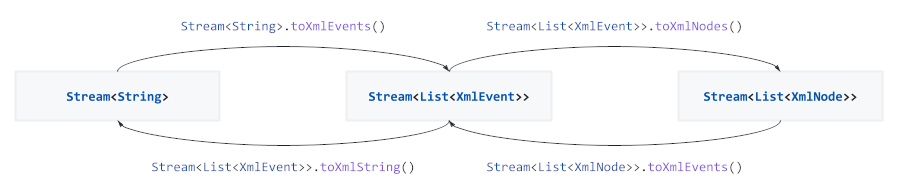
For more control the underlying Codec and Converter implementations can be used:
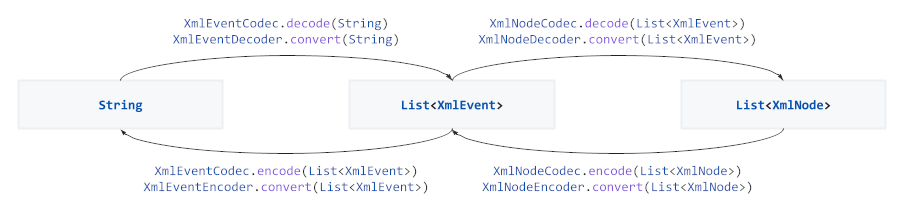
Various other transformations are provided to simplify processing complex streams:
- Normalizes a sequence of
XmlEventobjects by removing empty and combining adjacent text events.
Stream<List<XmlEvent>> normalizeEvents()onStream<List<XmlEvent>> - Annotates
XmlEventobjects with their parent events that is thereafter accessible throughXmlParented.parentEvent. Validates the nesting and throws an exception if it is invalid.
Stream<List<XmlEvent>> withParentEvents()onStream<List<XmlEvent>> - From a sequence of
XmlEventobjects filter the event sequences that form sub-trees for which a predicate returnstrue.
Stream<List<XmlEvent>> selectSubtreeEvents(Predicate<XmlStartElementEvent>)onStream<List<XmlEvent>> - Flattens a chunked stream of objects to a stream of objects.
Stream<T> flatten()onStream<Iterable<T>> - Executes the provided callbacks on each event of this stream.
Future forEachEvent({onText: ...})onStream<XmlEvent>. - Executes the provided callbacks on each event of this stream as a side-effect.
Stream<XmlEvent> tapEachEvent({onText: ...})onStream<XmlEvent>.
For example, the following snippet downloads data from the Internet, converts the UTF-8 input to a Dart String, decodes the stream of characters to XmlEvents, and finally normalizes and prints the events:
final url = Uri.parse('http://ip-api.com/xml/');
                final request = await HttpClient().getUrl(url);
                final response = await request.close();
                await response
                    .transform(utf8.decoder)
                    .toXmlEvents()
                    .normalizeEvents()
                    .forEachEvent(onText: (event) => print(event.value));
Similarly, the following snippet extracts sub-trees with location information from a sitemap.xml file, converts the XML events to XML nodes, and finally prints out the containing text:
final file = File('sitemap.xml');
                await file.openRead()
                    .transform(utf8.decoder)
                    .toXmlEvents()
                    .normalizeEvents()
                    .selectSubtreeEvents((event) => event.name == 'loc')
                    .toXmlNodes()
                    .expand((nodes) => nodes)
                    .forEach((node) => print(node.innerText));
A common challenge when processing XML event streams is the lack of hierarchical information, thus it is very hard to figure out parent dependencies such as looking up a namespace URI. The .withParentEvents() transformation validates the hierarchy and annotates the events with their parent event. This enables features (such as parentEvent and the namespaceUri accessor) and makes mapping and selecting events considerably simpler. For example:
await Stream.fromIterable([shiporderXsd])
                    .toXmlEvents()
                    .normalizeEvents()
                    .withParentEvents()
                    .selectSubtreeEvents((event) =>
                        event.localName == 'element' &&
                        event.namespaceUri == 'http://www.w3.org/2001/XMLSchema')
                    .toXmlNodes()
                    .expand((nodes) => nodes)
                    .forEach((node) => print(node.toXmlString(pretty: true)));
Misc
Examples
This package comes with several examples, as well as a web demo.
Furthermore, there are numerous packages depending on this package.
Supports
- ☑ Standard well-formed XML (and HTML).
- ☑ Reading documents using an event based API (SAX).
- ☑ Decodes and encodes commonly used character entities.
- ☑ Querying, traversing, and mutating API using Dart principles.
- ☑ Querying the DOM using a subset of XPath.
- ☑ Building XML trees using a builder API.
Limitations
- ☐ Doesn't validate namespace declarations.
- ☐ Doesn't validate schema declarations.
- ☐ Doesn't parse, apply or enforce the DTD.
- ☐ Doesn't support XSL or XSLT.
Standards
History
This library started as an example of the PetitParser library. To my own surprise various people started to use it to read XML files. In April 2014 I was asked to replace the original dart-xml library from John Evans.
License
The MIT License, see LICENSE.
Changelog
Changelog
6.6.1
- Dart and Flutter 3.9 compatibility.
- Minor optimization to eliminate unused namespaces.
6.6.0
- Dart 3.8 and PetitParser 7.0 requirement.
- Correct decoding of names with surrogate characters.
6.5.0
- Add support for most XPath 1.0 functions, including set-operations and ensuring document order for node-sets.
- Add support for XPath expression evaluation, user-defined variables, and user-defined functions.
- Add
XmlNode.xpathGenerateto create a readable XPath for all nodes. - Add support for node comparison:
XmlNode.isEqualNodeandXmlNode.compareNodePosition.
6.4.0
- Dart 3.0 and PetitParser 6.0 requirement.
- Add RSS feed reader example.
6.3.0
- Upgrade to Dart 2.19 and PetitParser 5.4.
- Add
XmlElement.tagconstructor that greatly simplifies the creation of elements, i.e.XmlElement(XmlName('br'), [], [], true)becomesXmlElement.tag('br', isSelfClosing: true). - Deprecate the ambiguous
XmlNode.text: Replace withXmlNode.valueto access the textual contents of the node, orXmlNode.innerTextto access the textual contents of its descendants. - Fix
XmlNode.siblingsand various related methods to also work correctly onXmlAttributenodes, make the method return a mutable list. - Improve
XmlNode.replace(XmlNode)and addXmlNode.remove()for easy removal of a node. - Improve error position propagation when building the XML DOM.
- Make the parser more forgiving when reading attributes.
- Experimental support of a subset of XPath.
- Add new-line normalization support.
6.2.0
- Upgrade to PetitParser 5.1 brings a 10% speed improvement (typed sequences).
- Add the ability to tap into a stream of
XmlEventwithtapEachEvent(similar toforEachEvent). - Remove
XmlNameequality operator==andhashCode. This is inconsistent with the other DOM nodes, and the provided implementation might not have the desired behavior. - Improved error reporting when accessing
innerTextorinnerXmlon DOM nodes that cannot have children.
6.1.0
- Dart 2.17 requirement.
- Validate the presence and order of root nodes when parsing; this got lost in 6.0.0 and can now also optionally be enabled for streaming and iterable parsers.
- Add support for basic document type parsing. The contents of the
XmlDoctypecan now be accessed throughname,externalIdandinternalSubset.
6.0.0
- Significantly improve parsing performance by up to 30%.
- Improved error handling to include more information, such as tag names and location in the parsed source.
- Use the pull-based parser for all underlying parsing operations:
- Reduce size of library by removing duplicated parsing and validation functionality.
- Fix entity decoding if the entity spawns multiple chunks.
- Cleanup dynamic calls and type declarations:
- Avoid all dynamic calls across the library (thanks to srawlins).
- Remove deprecated
XmlTransformeras it requires dynamic calls in theXmlVisitor. - Cleanup the dynamic typing of
XmlVisitor.
XmlBuilderkeeps keeps correct nesting, even in case of exceptions.- Remove deprecated code:
parse(String input): useXmlDocument.parse(String input)orXmlDocumentFragment.parse(String input)instead.XmlBuilder.build(): useXmlBuilder.buildDocument()orXmlBuilder.buildFragment()instead.XmlNormalizer.defaultInstance: useconst XmlNormalizer()instead.XmlProductionDefinition,XmlGrammarDefinition, andXmlParserDefinition.
5.4.0
- Dart 2.16 requirement.
- Update to PetitParser 5.0.
- Escape control characters (thanks to rspilker).
- Add a predicate to pretty printer to insert a space character before self-closing elements (thanks to rspilker).
- Add predicates to normalizer to trim leading and trailing whitespaces, as well as collapse consecutive whitespaces.
- Expose
qualifiedName,localName,namespacePrefixandnamespaceUrifor convenience on the named nodes.
5.3.0
- Dart 2.15 requirement.
- Upgrade to PetitParser 4.3.
5.2.0
- A series of read-only accessors that simplify navigating the XML DOM with
XmlElements:- Add
XmlNode.childElements. - Add
XmlNode.siblingsandXmlNode.siblingElements. - Add
XmlNode.previousElementSiblingandXmlNode.nextElementSibling. - Add
XmlNode.ancestorElements,XmlNode.precedingElements,XmlNode.descendantElements, andXmlNode.followingElements.
- Add
5.1.1
- Fix printing of Exceptions.
- Fix parsing of DOCTYPE tags.
5.1.0
- Upgrade to PetitParser 4.1.0.
5.0.0
- Dart 2.12 requirement and null-safety.
- Add the possibility to
XmlBuilderto add raw strings. - Improve error reporting (particularly for fragment parsing).
- Default entity mapping is now a global setting.
- Improve tutorials and documentation.
4.5.0
- Fixed a bug in the XML name parsing where certain unicode planes were not correctly recognized.
- Removed const constructor from
XmlEventto be able to add a lazy initializedparentEventfield. - Add
XmlWithParentEventsthat provides validation of event nesting and efficient access to the parent events. Usestream.withParentEvents()to annotate the stream accordingly. - Add namespace resolution to events through
event.namespaceUri. Note that the data is only available when the parent information is present (see above). - Fix namespace resolutions for events in selected sub-tree nodes, even if the namespace declaration is not part of the visible DOM.
- Add
stream.forEachEvent(onText: ...)for easier callback based stream processing.
4.4.0
- Add a
XmlSubtreeSelectorthat allows efficient filtering of events in specific sub-trees. Usestream.selectSubtreeEvents(...)to filter the stream accordingly. - Add more options to XML pretty printer, namely the possibility to sort and indent attributes.
- Add typed extension methods for all stream converters, for simpler and more fluent API.
- Improvements to documentation and examples.
4.3.0
- Improve error reporting of
XmlBuilderand add possibility to buildXmlDocumentFragments. - Improvements to documentation and examples.
4.2.0
- Deprecate standalone
XmlDocument parse(String input)method, and introduce factory methods in the respective nodesXmlDocument.parse(String input)andXmlDocumentFragment.parse(String input). - Introduce getters and setters for
XmlNode.innerText(in most cases an alias toXmlNode.text),XmlNode.innerXmlandXmlNode.outerXml. - Improved support for
XmlDocumentFragmentacross the library. - Remove the
XmlDocument.textoverride, which returnednull. - Add
XmlNode.replace(XmlNode other)to make it easier to replace nodes in an existing tree. - Add
XmlNode.getElement(String name)as a shortcut to find the first child element with a given name. - Add
XmlNode.firstElementChildandXmlNode.lastElementChildto easy access the first/last child element. - Add support to selectively disable whitespace normalization while pretty-printing, for example
document.toXmlString(pretty: true, preserveWhitespace: (node) => node is XmlElement && node.name.local == 'pre')would keep everything within<pre>tags as-is.
4.1.0
- Improve the pretty printing and the customization of the pretty printing:
XmlWriterandXmlPrettyWriterare now initialized with optional arguments.- Pretty printing now also supports to customize the newline support.
- Example is updated to also syntax highlight / colorize the output.
- Add full namespace support to attribute accessors
setAttributeandremoveAttribute. - Improved the documentation, particularly started a section on
xml_eventspackage.
4.0.0
- Cleanup the node hierarchy. Specifically removed
XmlOwnedandXmlParentthat added a lot of complexity and confusion. Instead, introduced dedicated mixins for nodes with attributes (XmlHasAttributes), children (XmlHasChildren), names (XmlHasName) or parents (XmlHasParent). - Introduce
XmlDeclarationnodes, events and builder to make accessing XML version and encoding simpler.
3.7.0
- Update to PetitParser 3.0.0.
- Dart 2.7 compatibility and requirement.
3.6.0
- Entity decoding and encoding is now configurable with an
XmlEntityMapping. All operations that read or write XML can now (optionally) be configured with an entity mapper. - The default entity mapping used only maps XML entities, as opposed to all HTML entities as in
previous versions. To get the old behavior use
XmlDefaultEntityMapping.html5. - Made
XmlParserErroraFormatExceptionto follow typical Dart exception style. - Add an example demonstrating the interaction with HTTP APIs.
3.5.0
- Dart 2.3 compatibility and requirement.
- Turn various abstract classes into proper mixins.
- Numerous documentation improvements and code optimizations.
- Add an event parser example.
3.4.0
- Dart 2.2 compatibility and requirement.
- Take advantage of PetitParser fast-parse mode:
- 15-30% faster DOM parsing, and
- 15-50% faster event parsing.
- Improve error messages and reporting.
3.3.0
- New events based parsing in
xml_events:- Lazy event parsing from an XML string into an
IterableofXmlEvent. - Async converters between streams of XML,
XmlEventandXmlNode.
- Lazy event parsing from an XML string into an
- Clean up package structure by moving internal packages into the
src/subtree. - Remove the experimental SAX parser, the event parser allows more flexible streaming XML consumption.
3.2.4
- Remove unnecessary whitespace when printing self-closing tags.
- Remember if an element is self-closing for stable printing.
3.2.0
- Migrated to PetitParser 2.0
3.1.0
- Drop Dart 1.0 compatibility
- Cleanup, optimization and improved documentation
- Add experimental support for SAX parsing
3.0.0
- Mutable DOM
- Cleaned up documentation
- Dart 2.0 strong mode compatibility
- Reformatted using dartfmt
2.6.0
- Fix CDATA encoding
- Migrate to micro libraries
- Fixed linter issues
2.5.0
- Generic Method syntax with Dart 1.21
2.4.5
- Do no longer use
ArgumentError, but instead use proper exceptions.
2.4.4
- Fixed attribute escaping
- Preserve single and double quotes
2.4.3
- Improved documentation
2.4.2
- Use enum as the node type
2.4.1
- Fixed attribute escaping
2.4.0
- Fixed linter issues
- Cleanup node hierarchy
2.3.2
- Improved documentation
2.3.1
- Improved test coverage
2.3.0
- Improved comments
- Optimize namespaces
2.2.2
- Formatted source
2.2.1
- Cleanup pretty printing
2.2.0
- Improved comments